CaseThread User & Admin Guide
Current as of v0.3.0 · updated 2026-07-17
See what's new for changes since the last version.
Read this first: everything in this build is a demonstration on synthetic data. Every corpus case, person, address, phone number, and business is fictional, and the app makes zero calls to the internet. Cases you import are real files you chose to drop in — they stay in your browser and never leave the machine. See Known Gaps & Honest Limits for exactly where the demo ends and the specified product begins.
1. Overview
CaseThread is a second detective. You give it a case file; it gives you back a living, source-cited case theory: a timeline, the people and vehicles and how they connect, every contradiction between statements and evidence, what "beyond a reasonable doubt" still needs, and a prosecutor-ready packet — with every single fact linked to the exact page, paragraph, or timestamp it came from.
The product rule that governs everything: if it can't cite it, it can't say it. Anything the system infers or hypothesizes is visibly labeled as such and can never masquerade as a fact.
Who it's for: detectives working active cases, sergeants running a unit, responding officers whose intake feeds the case, cold-case detectives looking for a starting point, and prosecutors receiving the handoff.
What this build is: a fully working demonstration running on five synthetic cases (a burglary with a stolen Range Rover, a linked burglary, a robbery with a shaky eyewitness ID, a control case that looks connected but isn't, and a practice case for training) — plus a real import pipeline: drop your own text documents and they become a case, with a human confirmation gate on every extracted record. It runs in your browser, entirely offline.
[SCREENSHOT: department-home] 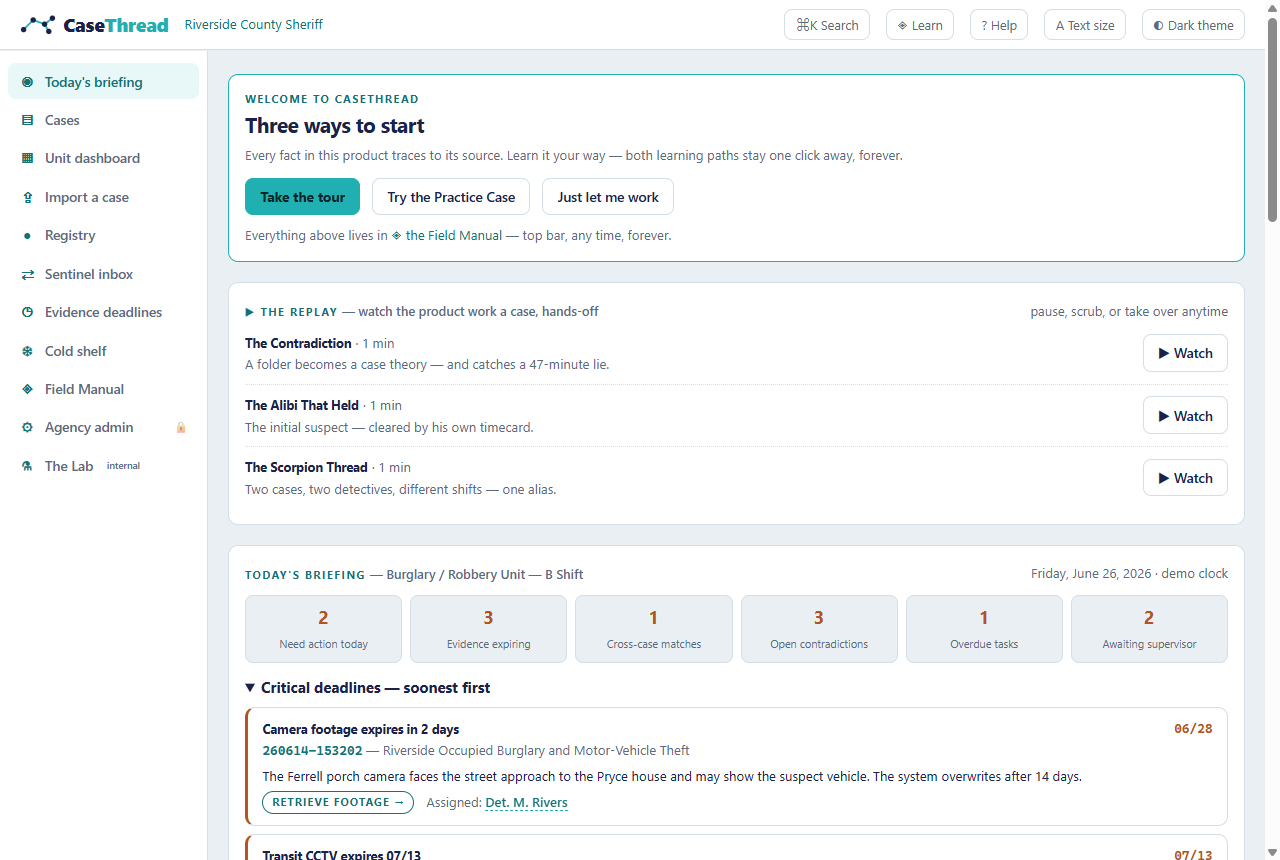
2. Quick Start — your first win in three minutes
- Open the app at
http://localhost:3111(see Admin & Operator Guide if it isn't running). You'll land on Department Home. - On first visit you'll see "Three ways to start." Click Take the tour for a ten-step guided walkthrough — it wears the CaseThread mark and covers the briefing, a case worked end to end, the unit dashboard, import, and the Registry.
- Under My cases, click SYN-001 — Riverside Occupied Burglary. You're now on the case's thread view: the full timeline of a burglary, reconstructed from eight documents.
- Find the event "Receipt: cash purchase at Shell #4419 (Exhibit 12)" and click the small teal chip next to it (it reads
D5 p.1). A panel slides in showing the actual supplemental report, scrolled to the exact paragraph, highlighted — with the document's cryptographic fingerprint at the bottom. That click is the whole product. PressEscto close. - Click the ledger tab (or press
3). The top card shows the case's famous contradiction: the victim says "around 9:00 PM" — but the receipt says 21:47. Both sources, side by side. - Press
4for the board, then click the teal ⚖ Test this theory button. CaseThread argues against the working theory: three competing hypotheses scored against the evidence, a confirmation-bias alarm, and the questions a defense attorney would ask — eight months before a real one does.
You've just done what takes a detective a reading week: comprehended a case, chased a fact to its source, caught a lie, and stress-tested the theory.
Want to practice the other half — turning files into a case? Run the First Import Drill (/import/drill): three minutes, a real case file, graded calls, and nothing you do in it is recorded.
3. Who Uses CaseThread (Roles)
| Role | What they do in the app | Demo status |
|---|---|---|
| Detective | Works cases end-to-end: timeline, contradictions, elements, interviews, leads, packet; imports new case files | Available — this is the primary experience |
| Supervisor / Sergeant | Runs the Unit dashboard (/unit): assignment, dying evidence, held packets, quiet cases; reads the Case Pulse strip, morning digest, unit expiry board; reviews Sentinel cards | Available |
| Responding officer | Their First 48 intake appears as the handoff brief on a case's thread view; victim callbacks are logged there | Available as display + callback capture; the mobile intake form itself is Planned |
| Prosecutor | Receives the packet; in the specified product, gets a read-only portal + deficiency loop | Planned (packet structure is visible; the external portal is not built) |
| Administrator | Runs the demo, resets state, sets the agency's terminology pack, case-number format, statute book, and egress policy on the Agency admin page | Available (see 7.23 and §9) |
The demo has no login — everyone sees the detective experience, and the Agency admin page has a demo role switch. Role-based access control is specified for the pilot but not present in this build.
4. Finding Your Way (Navigation)
The left navigation — every surface
| Entry | Where it goes |
|---|---|
| ◉ Today's briefing | Department Home — the unit's day on one screen |
| ▤ Cases | The case browser: every case, filterable by detective and state |
| ▦ Unit dashboard | The sergeant's screen: assignment + case progression |
| ⇪ Import a case | Turn your own files into a case (with the practice drill) |
| ● Registry | Search every confirmed record across your cases |
| ⇄ Sentinel inbox | Possible cross-case connections awaiting your decision |
| ◷ Evidence deadlines | What expires next — across the unit, soonest first |
| ❄ Cold shelf | Cold cases with solvability rankings and restart plans |
| ◈ Field Manual | The permanent training wing |
| ⚙ Agency admin | Tenant settings: terminology, case numbers, statute book, egress |
| ⚗ The Lab | Internal: the engine's answer-key bench and playground |
The top bar — always present
| Control | What it does |
|---|---|
| CaseThread logo | Returns to Department Home from anywhere |
| Breadcrumb | Shows exactly where you are: Riverside County Sheriff · 260610-004821 · ledger. The case number is a click — it takes you back to that case's thread |
| ⌘K Search | The command palette — the fastest way anywhere (see below) |
| ◈ Learn | The Field Manual — the permanent training wing |
| ✦ Ask | Ask CaseThread — the guide, or your own cases, answered with citations that take you there (7.26) |
| ? Help | Keyboard reference + searchable glossary |
| A Text size | Cycles standard → large → extra large. The whole instrument scales — built for reading glasses left in the car |
| ◐ / ☀ theme | Toggles the dark "War Room" briefing-room theme |
The case tabs
Inside a case, ten views run across the top: thread · web · ledger · board · queue · files · interviews · packet · record · ✦ 3D. Things to notice:
- The web view has two faces: the entity graph, and the 📌 corkboard — the murder board, with draggable sticky notes and twine. Your choice is remembered per browser.
- The record is the case's audit spine: a live check that every statement in the case names a source that resolves (an uncited claim is blocked, never hidden), plus a permanent log of every decision you've made. It's what you hand a defense attorney. Nothing in it is ever deleted.
- Badges on the tabs are the case telling you where it hurts:
ledger 2= two open contradictions;board 2= two unproven elements;queue ⚠= a lead is expiring;packet 2= two release gates failing. No badge = nothing urgent there. Badges are computed from the case, never typed in. - A one-line hint under the tab bar explains the view you're on. Click hide hints once you don't need them (they stay hidden everywhere).
Keyboard (the fast way)
| Key | Action |
|---|---|
Ctrl/⌘ K | Command palette |
1–9 | Jump straight to a case tab (1 = thread … 8 = packet, 9 = record) |
C | Constellation Mode |
[ and ] | Previous / next tab |
? | Help & glossary |
Esc | Close any panel; exit the tour |
↑ ↓ / J, then K / X | On the import review: move through candidates, keep, reject |
The command palette — search the way you remember things
Press Ctrl/⌘ K anywhere. Type a name ("Pryce"), an alias ("Scorpion Leg"), a plate ("KRT-4402"), a statute ("810.02"), a time ("21:47"), or a document ("telematics") — results are typed so you always know what you're selecting. With an empty search box you get your recent views first, then learning shortcuts. Inside a case, "Go to:" entries jump to any view of the case you're standing in.
[SCREENSHOT: palette] 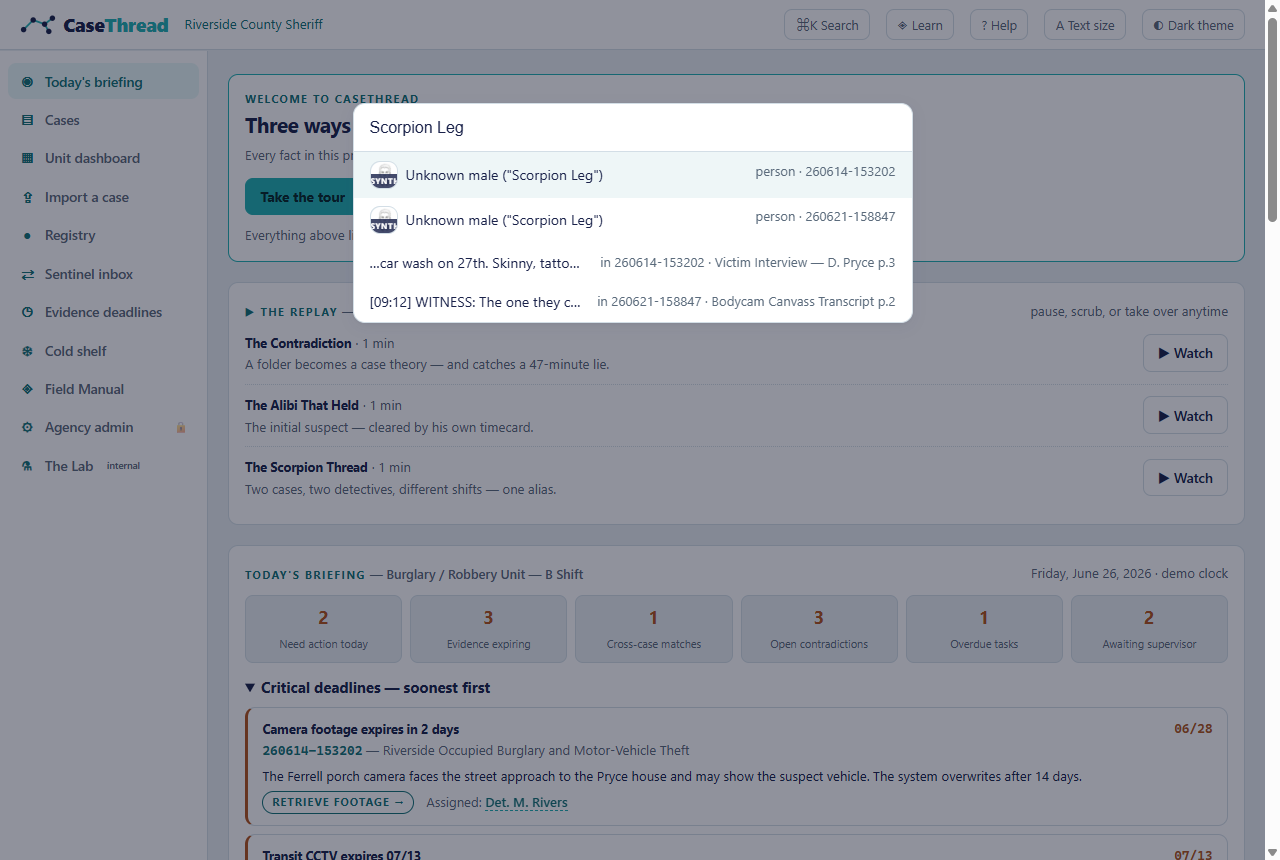
5. Core Concepts (the vocabulary the product runs on)
The ten claim labels. Every statement in CaseThread carries exactly one label, rendered as a small chip: verified fact · officer observation · witness statement · suspect statement · physical evidence · digital evidence · allegation · inference · AI-generated hypothesis · unresolved. Hover any chip for its definition. The point: a witness statement is a record that something was said, not a finding that it's true — and an AI hypothesis can never dress up as a fact.
Candidates vs. records. When CaseThread reads a document, everything it finds — names, plates, phones, addresses — is a candidate, not a record. A candidate becomes a record only when a human keeps it. Anything left undecided stays a candidate, riding the case in its Candidates drawer, and never enters the Registry. This gate is the difference between an index of your case files and a database of people.
Aliases. One person, written many ways — "Det. M. Rivers" in a byline, "Rivers" in an owner column, "Scorpion Leg" on the street. A record carries its other names in aliases, each with the citation for where that name appeared. Search matches aliases as whole phrases ("Scorpion Leg" — never "Riverside" when you meant "Rivers").
Certainty bands. Timeline events are marked exact (a sourced timestamp), approximate (an estimate), or claimed (uncorroborated). The defense lives in the gap between 12:20 and 12:21, so certainty never hides.
Citations. The teal chips (like D3 p.2) that follow facts everywhere. Click one → the source viewer opens the actual document at the exact span, highlighted, with a SHA-256 fingerprint proving the original hasn't been touched.
Leads, not evidence. What the machine surfaces is a lead — a place to look, graded by source reliability and information validity. A human decides what it becomes. Nothing the system proposes acts on its own.
Measurement law. The Unit dashboard measures cases, never officers: volume and deadline exposure per detective, but no clearance rates, no rankings, no scores. That refusal is written into the product.
Closure vocabulary. Cases close the way departments actually close them: closed by arrest · exceptionally cleared · no further action · unfounded — and open–pending/suspended stays open, protecting the case decades later. The glossary (press ?) defines each.
Gates. Anything consequential the system proposes waits for a human: Sentinel connection cards need your Confirm/Reject, the packet won't release past failing checks, merges are offered but never performed, contradiction states change only when you change them.
6. Main Workflows
6.1 Work a case cold (the inherited-file problem)
- From Department Home, open the case (e.g., SYN-001).
- If you've been here before, the "Since you were here" card lists what changed since your last visit — read it, then Dismiss.
- On thread, read the case summary, then the First 48 handoff brief — what the responding officer captured, what the intake missed, and any victim callback. If the victim calls back with something new, log it right there: the callback capture takes the caller, what they said, and stamps who took it — it lands on the case, cited like everything else.
- Walk the timeline. Note the shaded 48 hours before the offense and any ⚑ last confirmed position anchor — e.g., the moment the stolen car's tracker went dark at a known intersection.
- Check the right rail: Missing pieces (what the case doesn't know yet) and Next best actions (ranked recommendations with reasons).
- Press
3for the ledger and review every open contradiction before someone else finds it.
What you'll see: a case you can hold in your head in minutes. Common mistake: skipping the right rail — it's the product's heartbeat, not a sidebar.
[SCREENSHOT: case-thread] 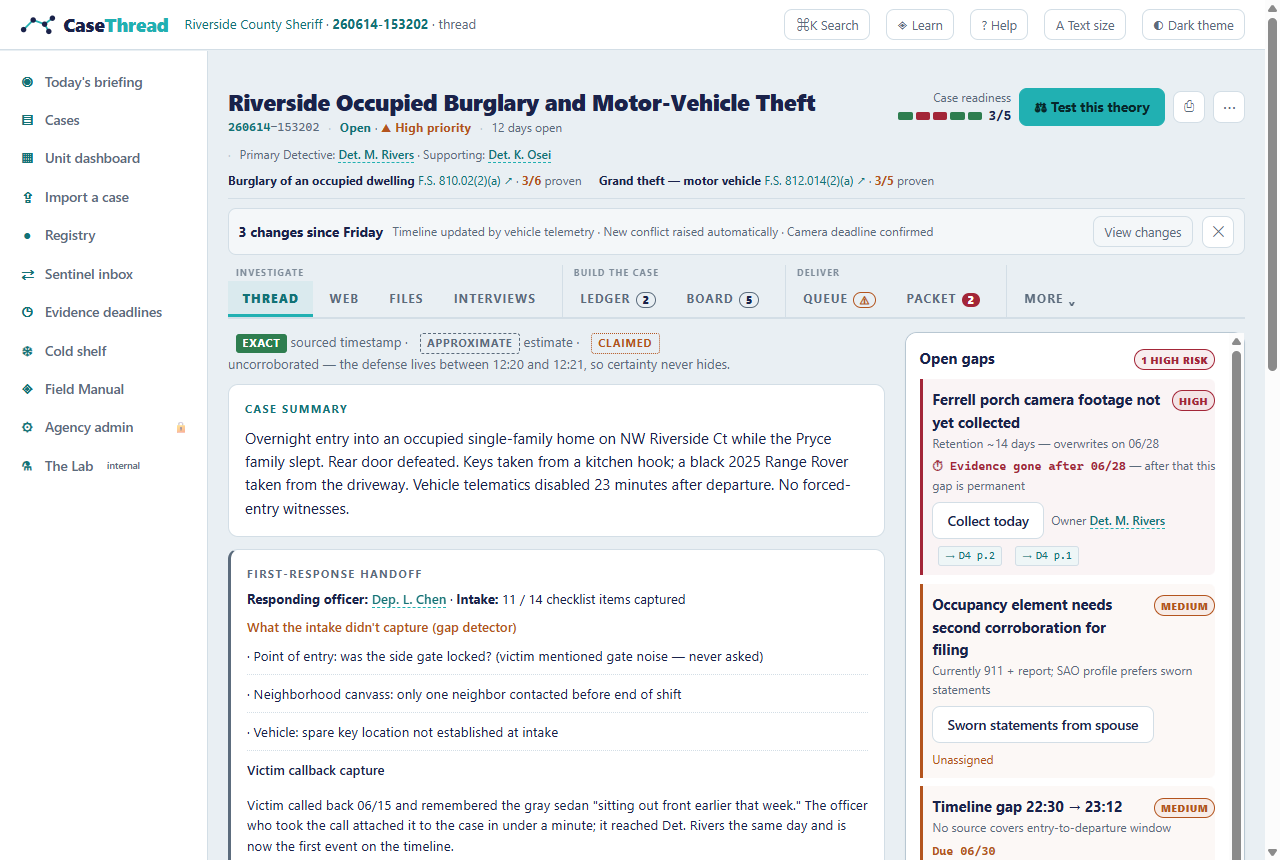
6.2 Chase a fact to its source
- Anywhere you see a teal citation chip, click it.
- The source viewer slides in: the document's spans, with yours highlighted; document type, author, date; the SHA-256 fingerprint.
- Read the surrounding spans for context. Press
Escto return exactly where you were.
Example: on SYN-001's ledger, the 9:00-vs-9:47 card cites both the victim interview (D3 p.2) and the supplemental report (D5 p.1). Two clicks and you've read both original passages.
[SCREENSHOT: source-viewer] 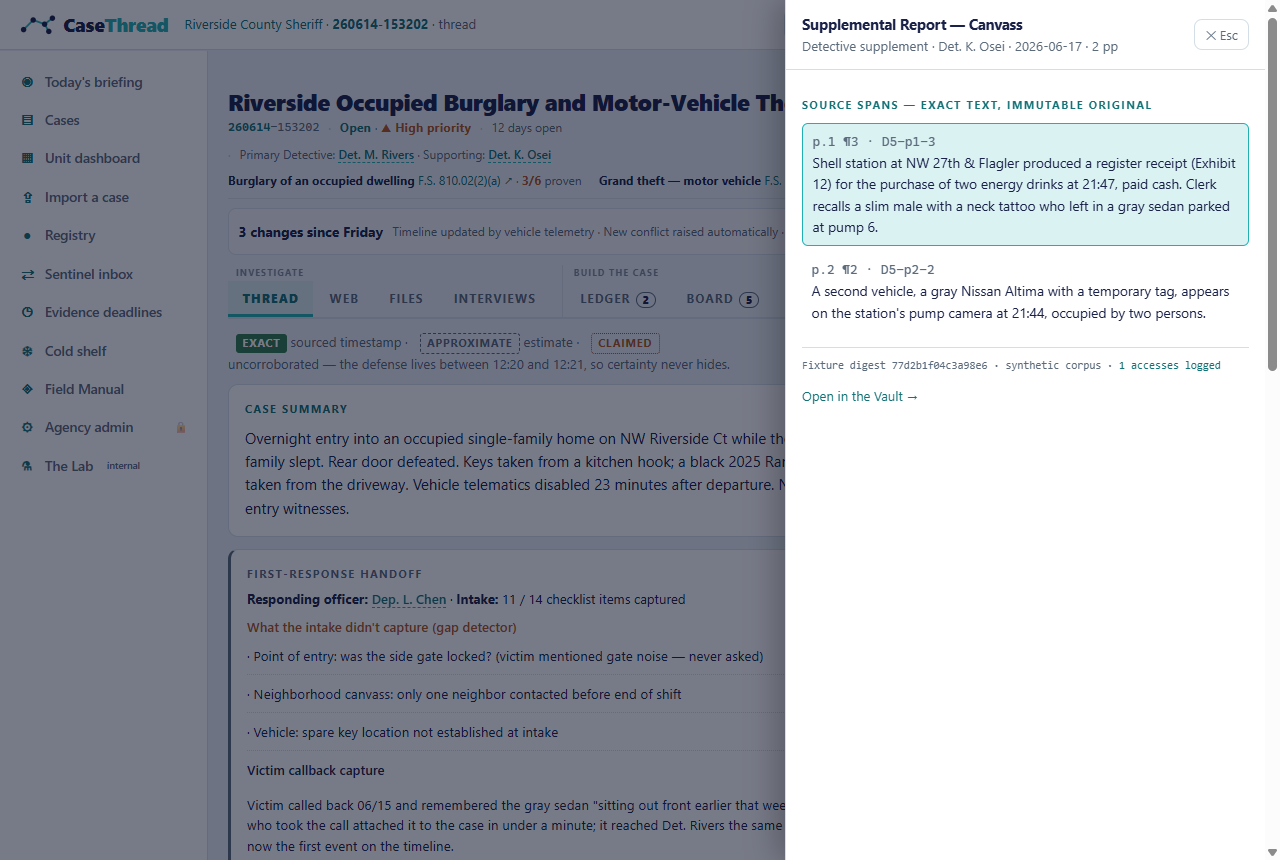
6.3 Challenge your theory (before the defense does)
- Open the board (
4). Top section: the Elements Matrix — every element the State must prove, per offense. Glowing rows are gaps. - Click ⚖ Test this theory.
- Read the confirmation-bias alarm if one fires (on SYN-001 it explains why the initial suspect theory now rests on pattern-matching, with two evidence conflicts).
- Read the hypothesis grid: every claim scored Supports / Conflicts / · neutral / ? unknown against every theory — including the mandatory misidentification theory, which can be eliminated with reasons but never deleted.
- Read the defense's cross (the questions opposing counsel would ask) and the discriminating evidence (what would actually separate the theories).
What you'll see on SYN-003 (the robbery): the working theory is the least supported on its own board — that's the product working, not failing.
[SCREENSHOT: board-challenge] 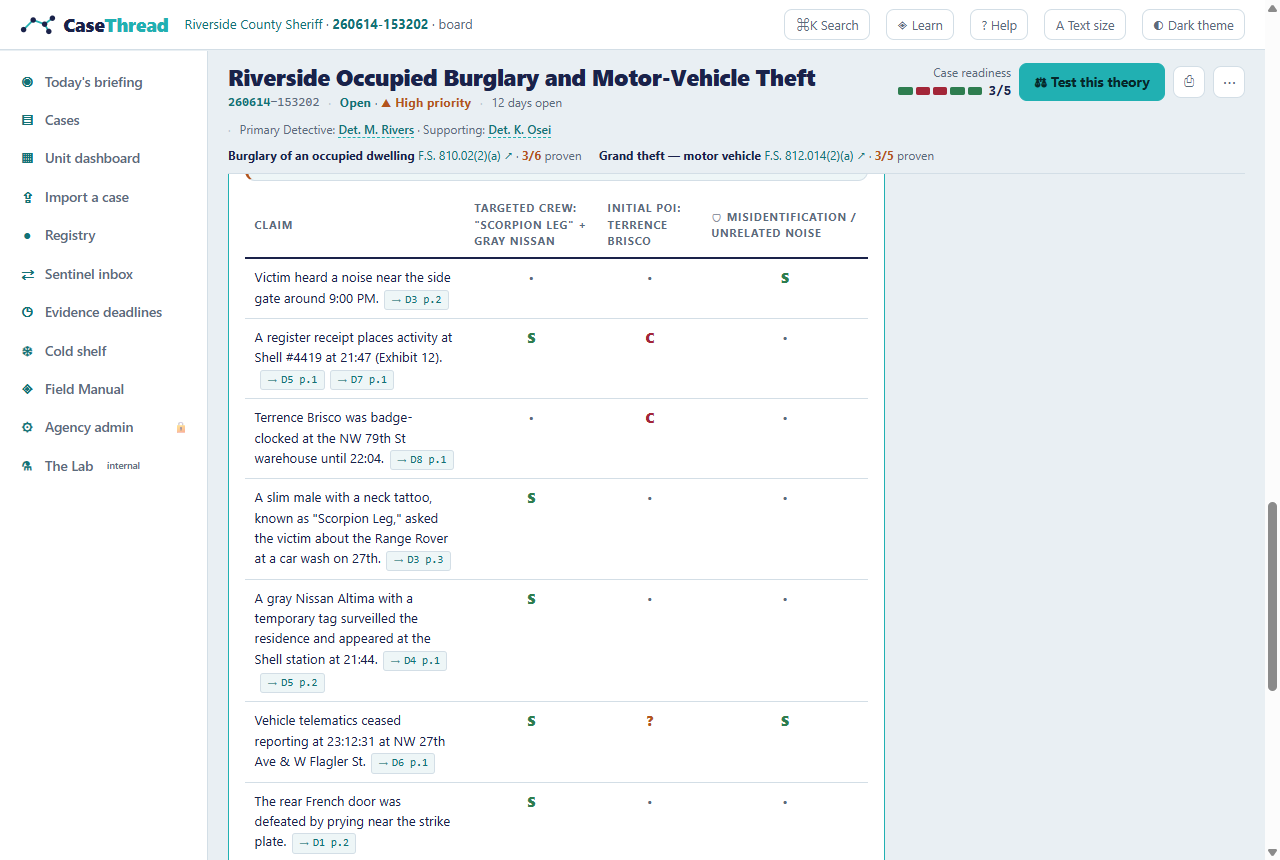
6.4 Keep evidence from expiring
- Open the queue (
5). Leads are graded (source reliability × information validity), owned, and dated. - Red dates in the Expires column are countdowns — camera loops overwrite, retention windows purge.
- Below, the Legal Process Desk tracks preservation letters, records requests, and subpoena drafts — with the playbook for the case's data (on SYN-001: who holds the telematics data and what process gets it).
- Department-wide: Evidence deadlines in the left nav shows every perishable item across all cases, soonest first.
[SCREENSHOT: queue] 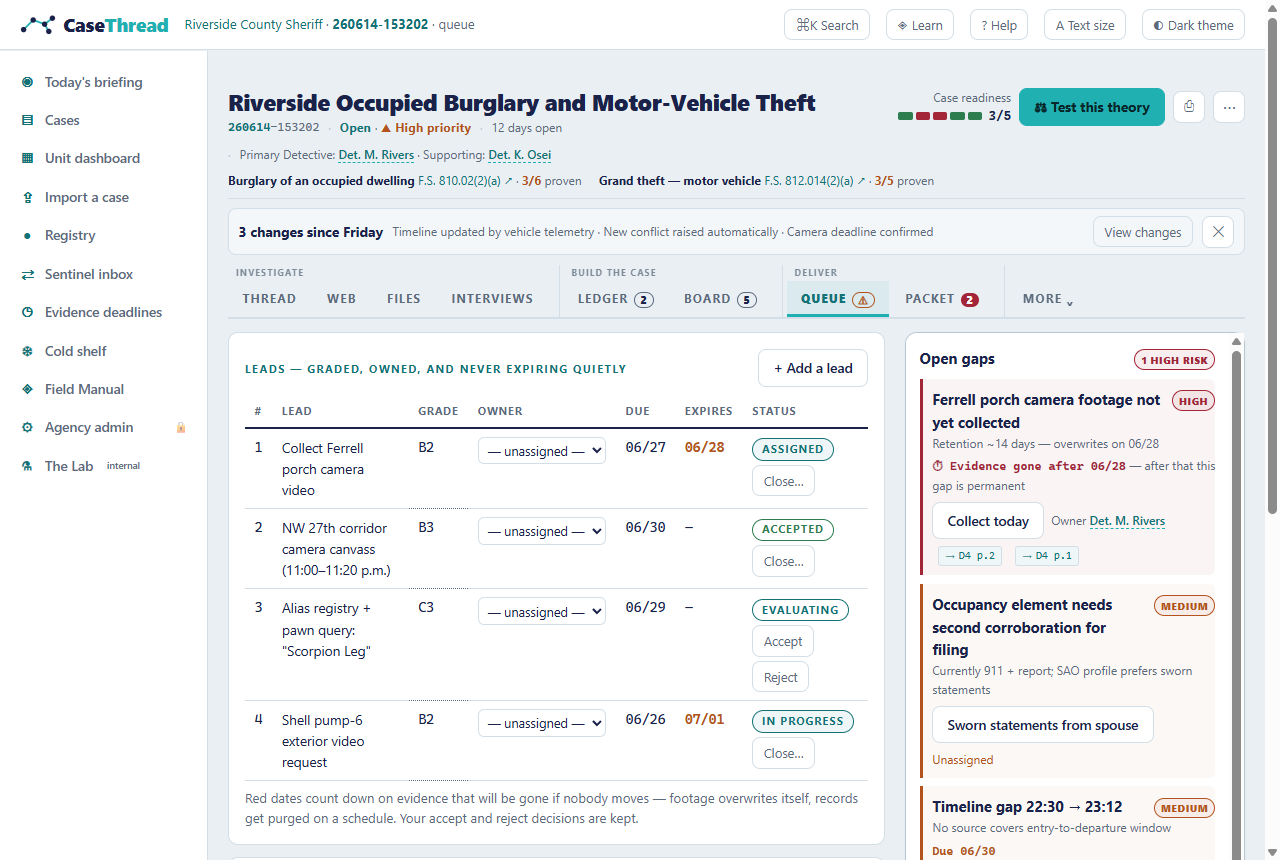
6.5 Review a possible cross-case connection
- On Department Home, find the Sentinel inbox.
- Each card shows a possible connection with supporting indicators on the left and against/disconfirming evidence on the right. The language is always "possible connection … human review required" — never "same offender."
- Click Confirm link or Reject — your decision is recorded, and rejected links stay rejected.
- Note the second card: SYN-001 ↔ SYN-005 is marked NOT linked — CaseThread refused the connection itself and explains why (different method, different corridor, no shared identifiers). A tool that refuses to overconnect is a tool you can trust when it says yes.
6.6 Import a case file (yours, not ours)
- Click ⇪ Import a case. Drop your documents —
.txt,.md,.csv, notes, transcripts. They are read right now, in this browser; nothing leaves the building. (PDFs, photos, and audio are accepted and listed but badgedPILOT— reading those needs the pilot engine, and the demo won't pretend.) - Read the files → CaseThread extracts every person, officer, alias, vehicle, plate, phone, and address it can find — one candidate per fact, even across files (a witness in two documents is one decision, and appearing twice raises confidence, never splits it).
- Confirm what's real. Every candidate shows its confidence band (likely · possible · weak), the reason it was proposed, and the exact passage it came from. Then:
- Keep or Not a thing, one at a time — or by keyboard:
↑↓move,Kkeep,Xreject. - Bulk keep — "Keep all 5 likely phones" is one command over a visible filter, recorded as one act, undoable as one act. Read the band list before the button — bulk is powerful and the file may hide junk in a likely band.
- The pencil ✎ — fix a 95%-right extraction ("Dep. Alvarez" where your department writes "Dep. C. Alvarez") without losing the original. The correction rides the record; the extraction that matches the cited page stays beside it, forever.
- "Possibly the same — you decide." When one person arrives written two ways, the cluster card offers a real merge: pick which name holds the record (◉), leave members out if the machine over-reached, then Merge into "…" — one record, the other names kept as aliases, every citation kept. Or say Not the same. Both are recorded, reversible acts. Merging is never automatic.
- Keep or Not a thing, one at a time — or by keyboard:
- Continue → name the case — a case number in your agency's format is assigned, every document gets a real SHA-256 over its real bytes, and the case opens on its thread.
- Anything you left undecided stays a candidate — the case thread shows a Candidates drawer where you can keep or dismiss them later, each act logged.
What you'll see afterward: your confirmed records in the Registry alongside the corpus — each carrying "Extracted from <case-no> · confirmed by <you>," its confidence, and any aliases in quotes. The whole review session — every decision, correction, bulk act, and merge — is retained on the case record. Total draft retention covers the machine's drafts too.
[SCREENSHOT: import-station] 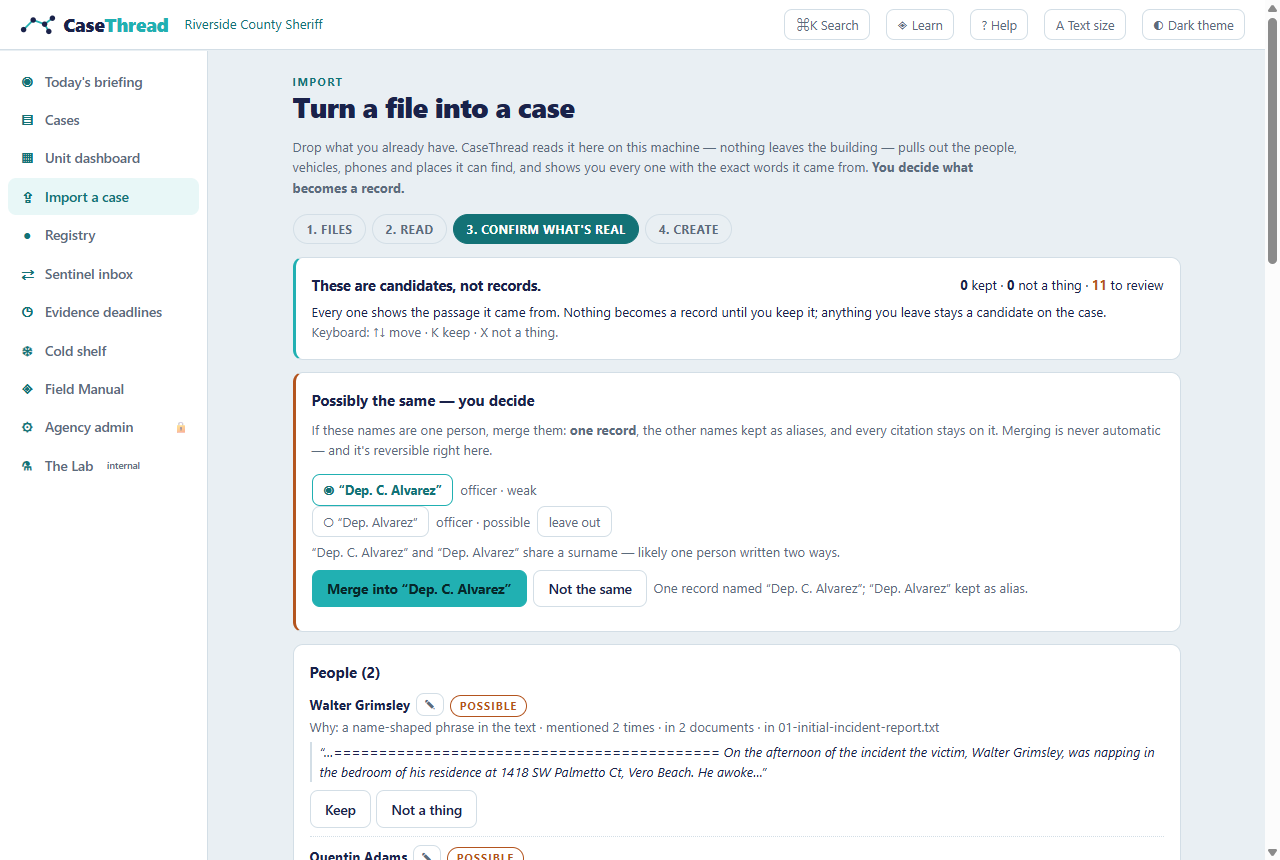
[SCREENSHOT: merge-cluster] 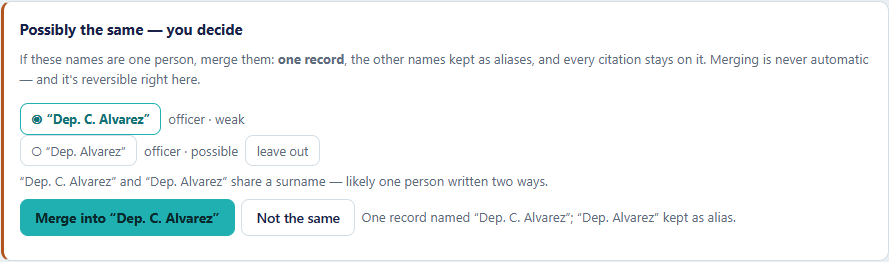
6.7 Run the First Import Drill (before your first real one)
- Open ⇪ Import a case → Run the drill (or go straight to
/import/drill, or find it in the Field Manual). - Read the briefing — it names the skills, not the answers — then Deal the file: two documents rendering a real published case (Adams v. State, identifiers synthetic).
- Work the station exactly like a real import: keep what's real, say Not a thing to junk, fold the deputy who arrives written two ways into one record.
- Finish → the debrief. Four numbers a cop answers for: false records (junk that became a record — the number a defense attorney reads), real records lost, records for the deputy (one man, one record), and the trap (one candidate only looks like a record — the file hides an appellate citation shaped like a plate, sitting in the likely band where a blind bulk-keep will grab it).
- Every miss shows your call vs. the book with the passage-grounded reason. Run it again until the file is clean.
The promise, kept literally: practice leaves no record. Nothing you do in the drill enters the case list, the Registry, or the audit trail.
[SCREENSHOT: drill-debrief] 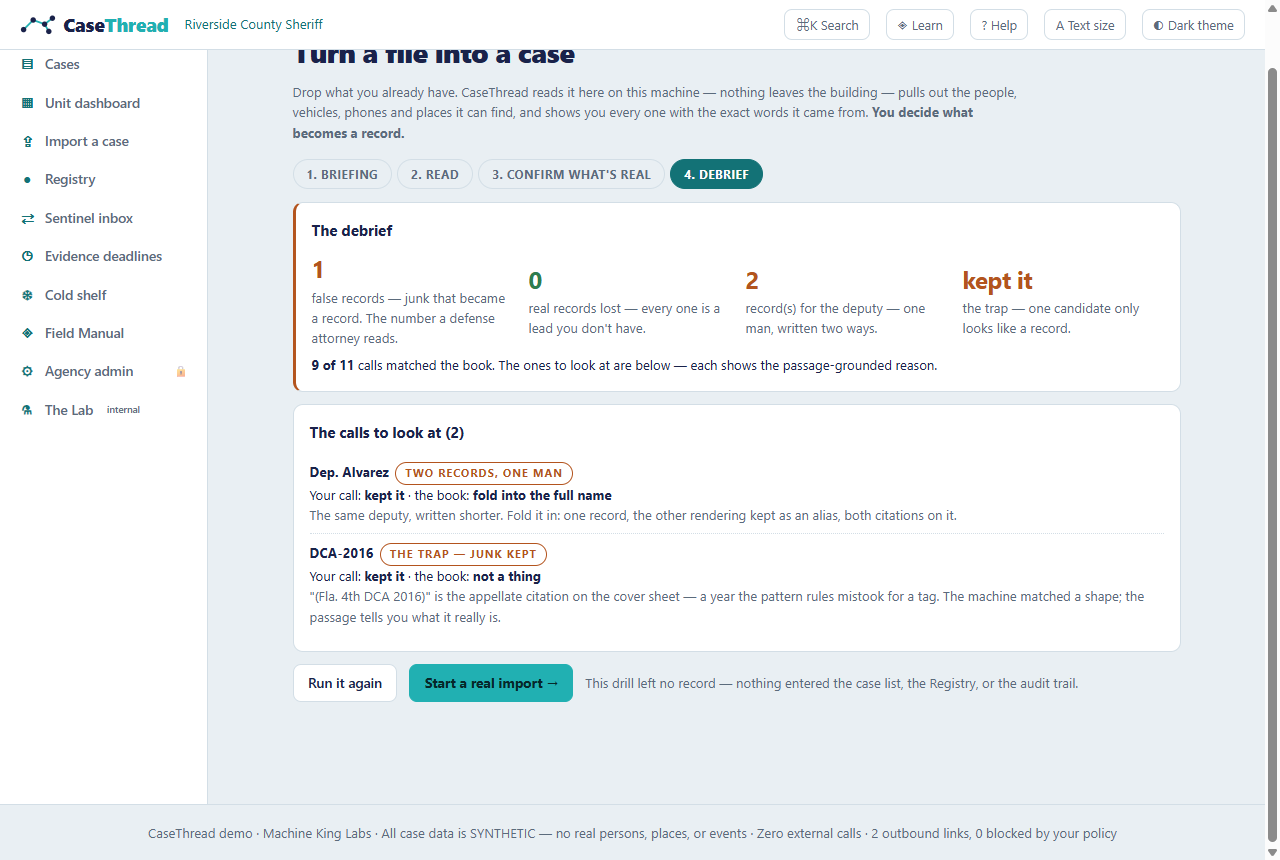
6.8 Run the unit (assign, watch, unstick)
- Open ▦ Unit dashboard. The top counters are derived live from the cases: unassigned · evidence dying (≤ 3 days) · packets held · quiet > 7 days.
- The needs-assignment rail lists cases with no owner. Pick a detective from the dropdown — a reason is required, and the assignment lands in the case record. The case header, the browser, Department Home, and this dashboard all read the same assignment — they can never disagree.
- The supervisor-attention strip surfaces what needs a sergeant: held packets (with the exact failing checks, straight from the packet page's own math), expiring evidence, unassigned leads.
- Below, cases group by detective — each line shows where the case stands (days open, quiet days, what's next), never a rate or a rank. CaseThread measures cases, not officers.
Example: after the demo reset, SYN-003 sits unassigned. Assign it to Det. K. Osei with the reason "robbery follow-up — Osei has the eyewitness-ID history," and watch the case header and Department Home update in the same breath.
[SCREENSHOT: unit-dashboard] 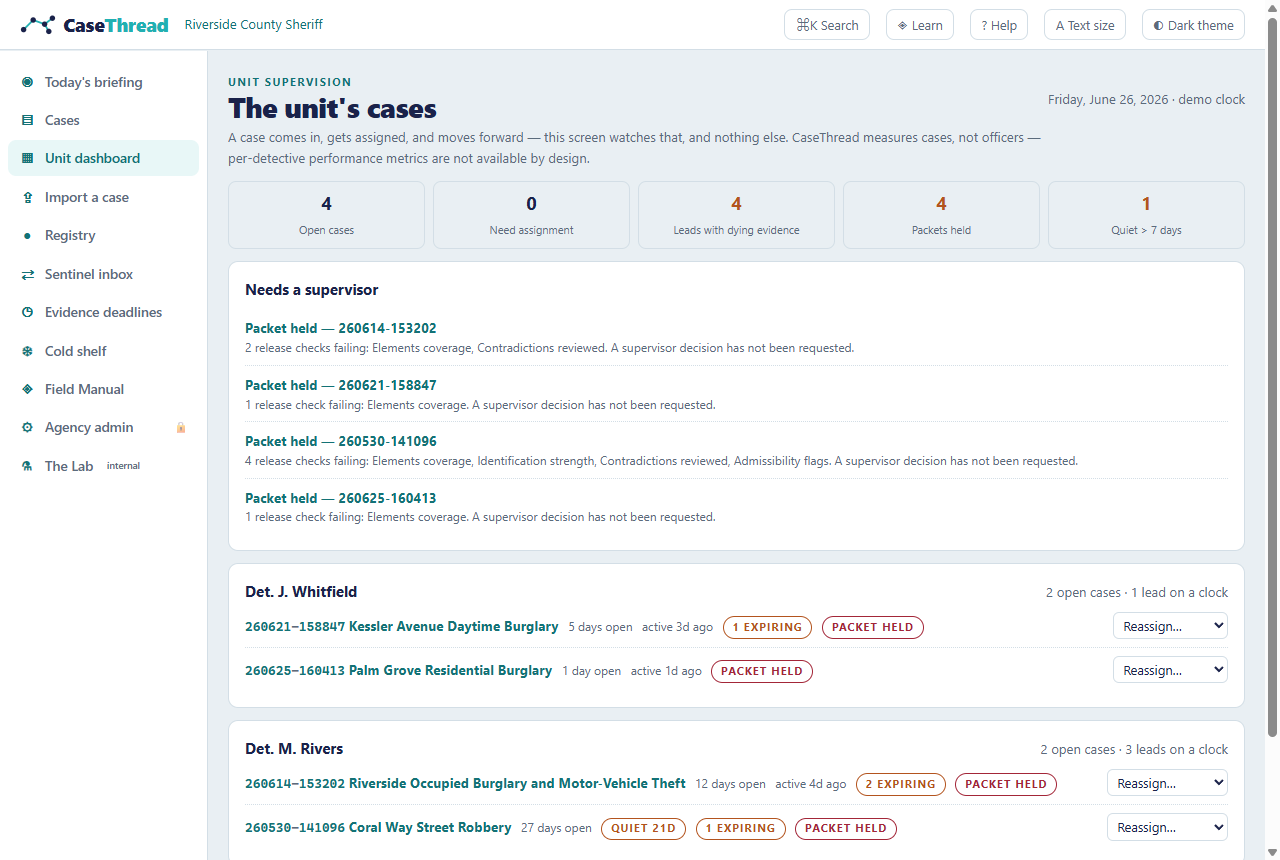
6.9 Search the Registry (case-initiated, always)
- Open ● Registry. It doesn't show you everyone — search is case-initiated only: you look a name up because a case gave you one. (Browsing everything is deliberately refused; the page says why.)
- Type a name, alias, plate, or phone — "Scorpion Leg" finds the unknown male across both burglaries; "555-0187" finds the phone that links the pawn record.
- Each result card carries its type, the cases it appears in, its provenance ("Extracted from
260626-…· confirmed by Det. M. Rivers" for imported records), confidence, and aliases in quotes. - Export CSV writes the current results — with aliases and provenance — for the 08:00 task-force meeting.
[SCREENSHOT: registry] 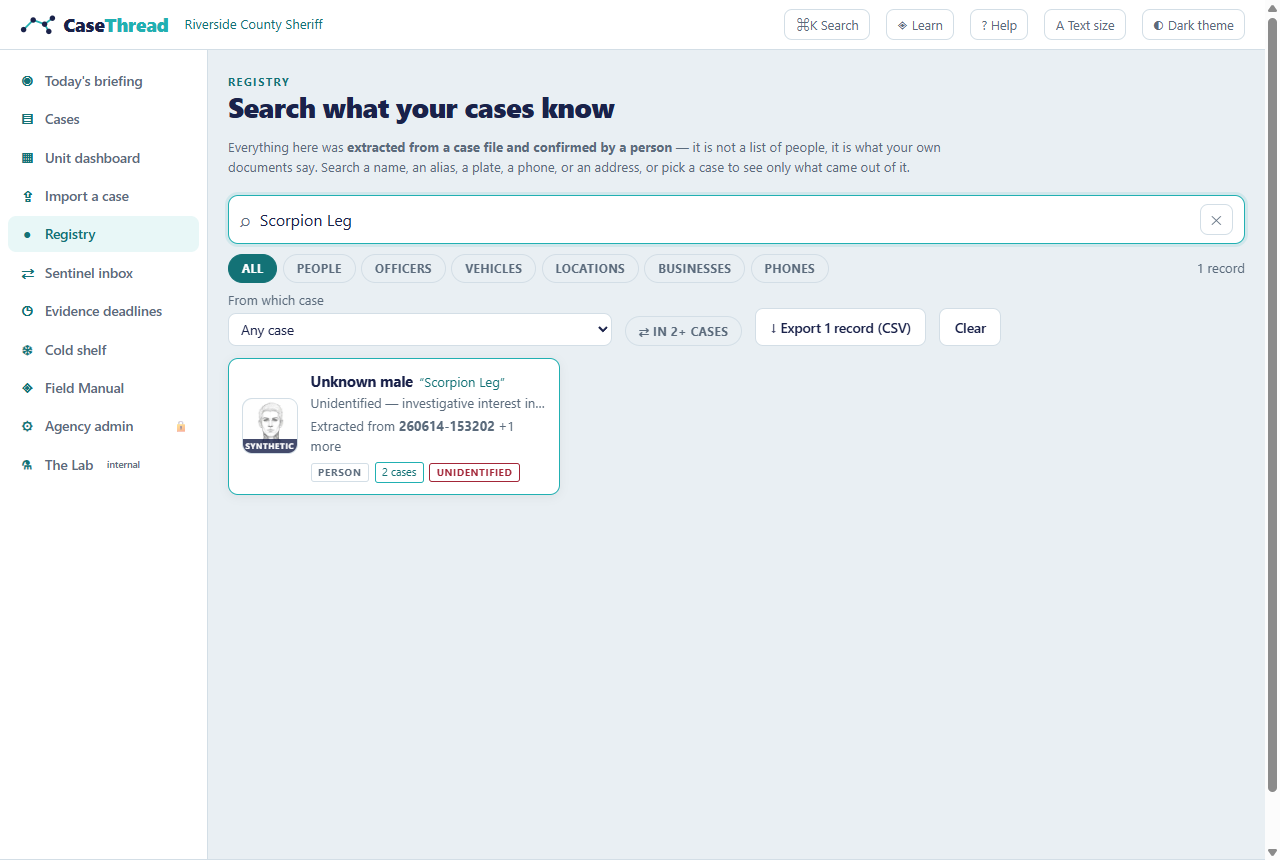
6.10 Learn the product (any time, forever)
- Click ◈ Learn in the top bar — the Field Manual.
- Choose your path: the guided tour (ten spotlight steps over the live UI, wearing the CaseThread mark), the Practice Case (learn by doing), the First Import Drill (practice the import gate), or browse the field guides (one per view, each with a "Show me →" link to a live example).
- In the Practice Case (TUT-101), the first three lessons complete only when you actually do the move — open a citation, view both sides of the contradiction, press Test this theory. No honor system.
[SCREENSHOT: field-manual] 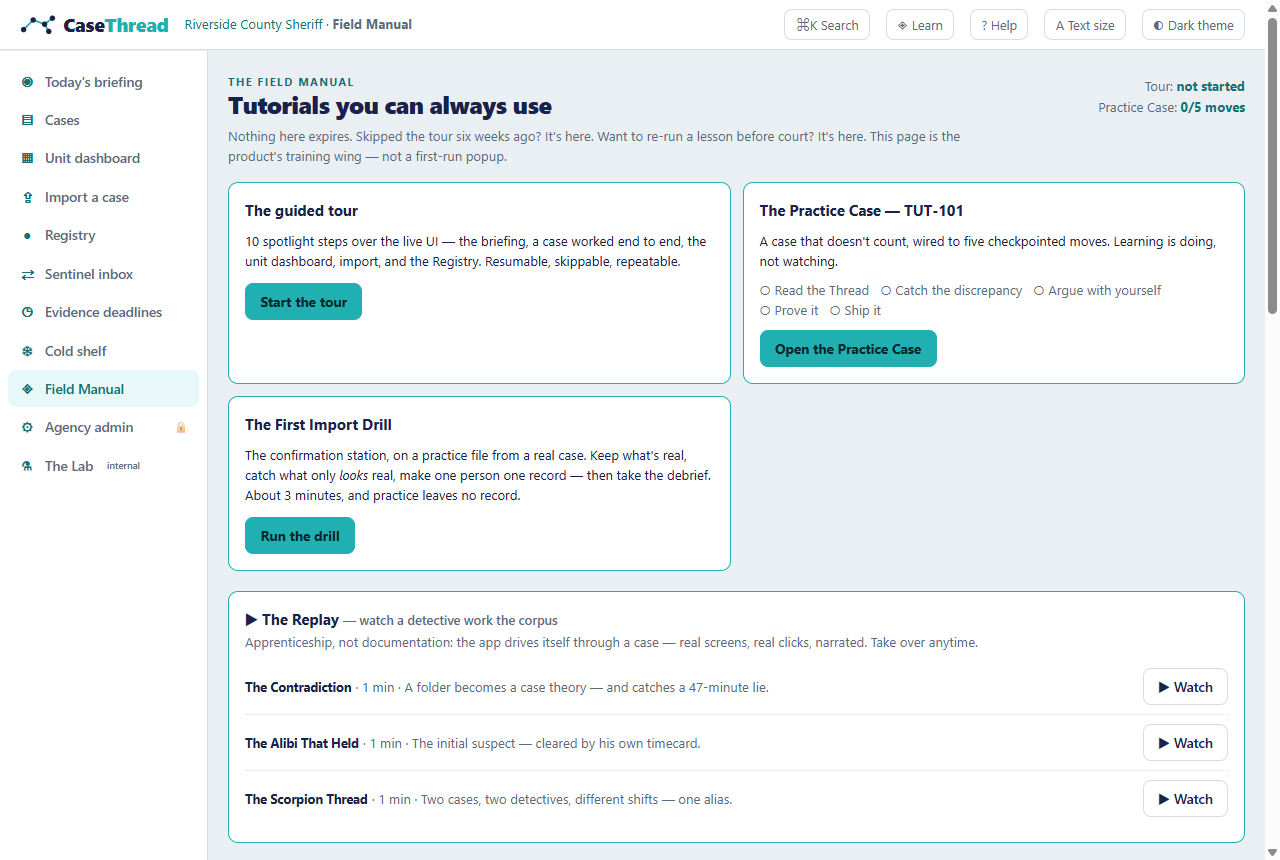
7. Feature Reference
Every feature below carries an honest status: Available (works in this demo) · Partial (visible but not fully functional) · Planned (specified, not built).
7.1 Department Home — Available
What it does: the landing view — your cases, the unit's pulse, cross-case alerts, and the cold shelf, with zero data entry. Where: / — the logo from anywhere. How to use it: scan top to bottom — Case Pulse (closures by real category, cycle time, prosecutor return rate), the Morning digest (overnight changes, stalls, expiring items), My cases, the Sentinel inbox, and in the right rail the Unit expiry board and the Cold shelf. Concrete example: the digest's first line — "SYN-001: telematics return ingested; lead L1 (camera) expires 06/28 — 2 days" — is a supervisor's entire morning briefing in one line. Limitations: Pulse numbers are frozen demo data; the digest is illustrative, not generated.
7.2 The Cases browser — Available
What it does: every case on one screen — corpus and imported — with the facts that matter for triage: status, priority, who holds it, days open, days quiet, what's next. Where: ▤ Cases in the left nav. How: filter by detective or state; sort by real movement ("recent activity" means the last time something actually happened on the case, not how long it's been open). Click through to any case. Example: filter to Det. K. Osei to see exactly what they're carrying — volume and deadlines, never a score.
[SCREENSHOT: cases-browser] 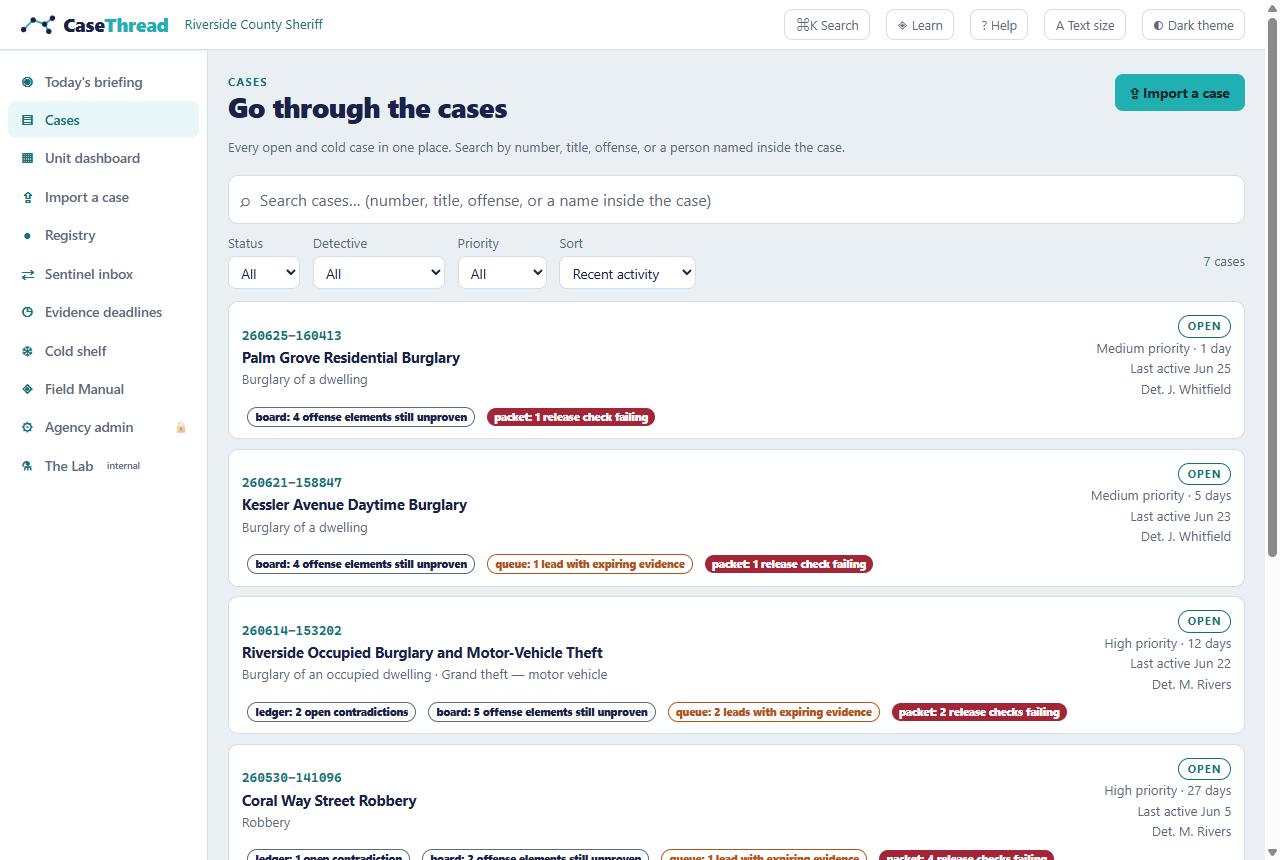
7.3 The Unit dashboard — Available
What it does: the sergeant's screen. Four derived counters (unassigned · evidence dying ≤ 3 days · packets held · quiet > 7 days), a needs-assignment rail, the supervisor-attention strip, and the unit's cases grouped by detective. Where: ▦ Unit dashboard, /unit. The one new verb: assignment. Assign or reassign a case → a reason is required → the act is logged to the case record. Every surface that names an owner reads the same assignment layer. The law on it: per person it shows volume and deadline exposure only — no clearance rates, no leaderboards, no rankings, ever. The refusal is written into the code and enforced by a test. Its numbers are the pages' numbers: "packets held" counts exactly the packets the packet page's own release check holds — the strip can neither cry wolf nor stay silent.
7.4 The Thread (timeline) — Available
What it does: the case as time — every event cited, certainty always visible, the 48-hour pre-incident window shaded, ⚑ last confirmed position anchors where digital trails die. Where: first tab in any case, or press 1. Also here: the First 48 handoff brief (what intake captured and missed), victim callback capture (log what the victim said when they called back — who, what, when, taken by whom), Statements by person (every statement a person made, case-wide, each cited — built for deposition and interview prep), and on imported cases the Candidates drawer (undecided extractions awaiting your call — not records). Example: SYN-001's anchor at 23:12 — the exact minute and intersection where the stolen Range Rover's telematics went dark — links straight to the Legal Process Desk playbook for getting the vendor's data. Limitations: corpus events are pre-computed; imported cases build their timeline from your documents' dates and times as extracted.
7.5 The Web + the Corkboard — Available
What it does: two faces of the same case graph. The Web: people, vehicles, phones, locations and their relationships in a deliberately deterministic 2D layout (the graph never reshuffles, so you build spatial memory). The 📌 Corkboard: the murder board — draggable sticky notes, twine strings for document links, and red string only where an open contradiction runs. Resolve the contradiction and the red string comes down: the board is derived, not decorated. How: the toggle at the top of the web view; your choice is remembered. Drag notes anywhere — positions are saved per case. Click any node or note for every text span that mentions it — the same citations panel either way. Example: click Unknown male ("Scorpion Leg") to see both mentions — the victim interview and the car-wash tip. On the corkboard, the red string between the victim's statement and the timecard is SYN-001's live contradiction.
[SCREENSHOT: entity-web] 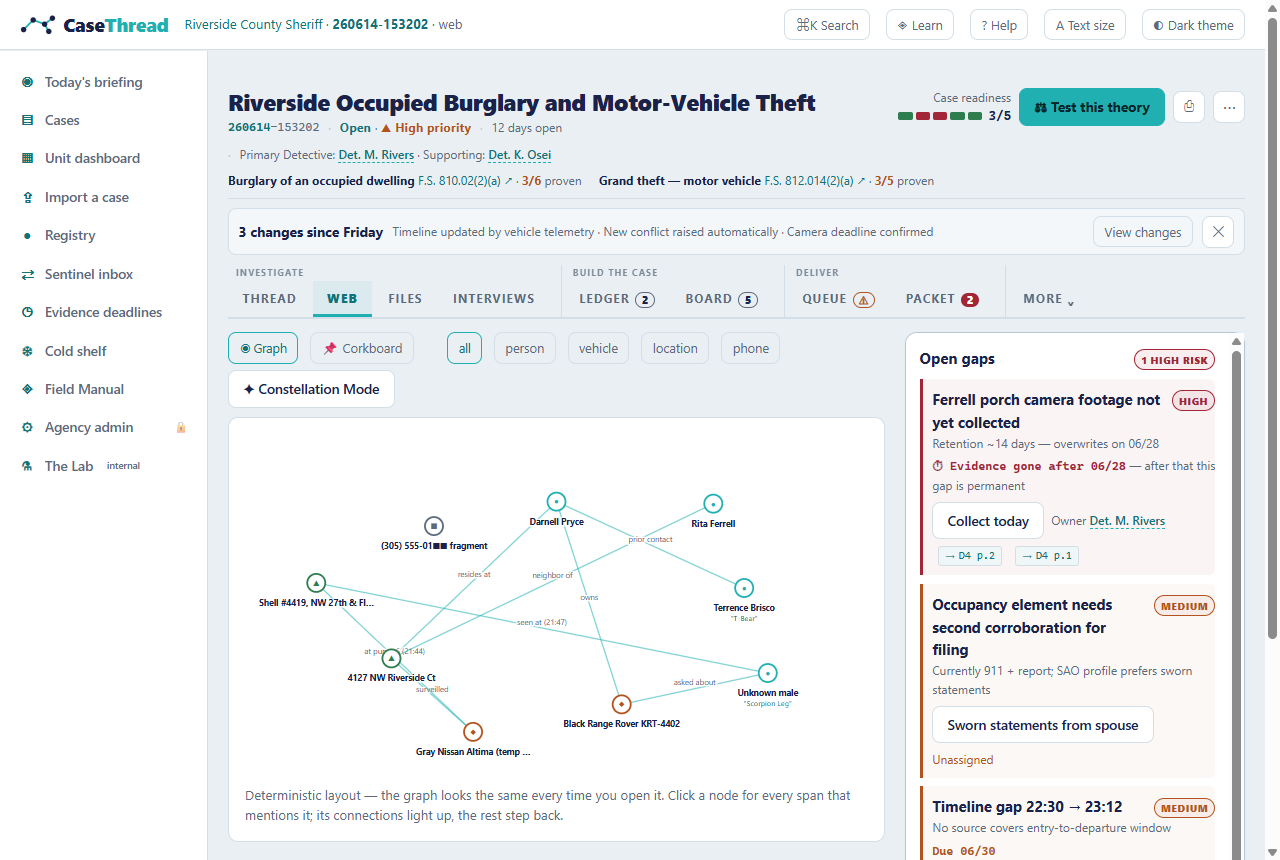
[SCREENSHOT: corkboard] 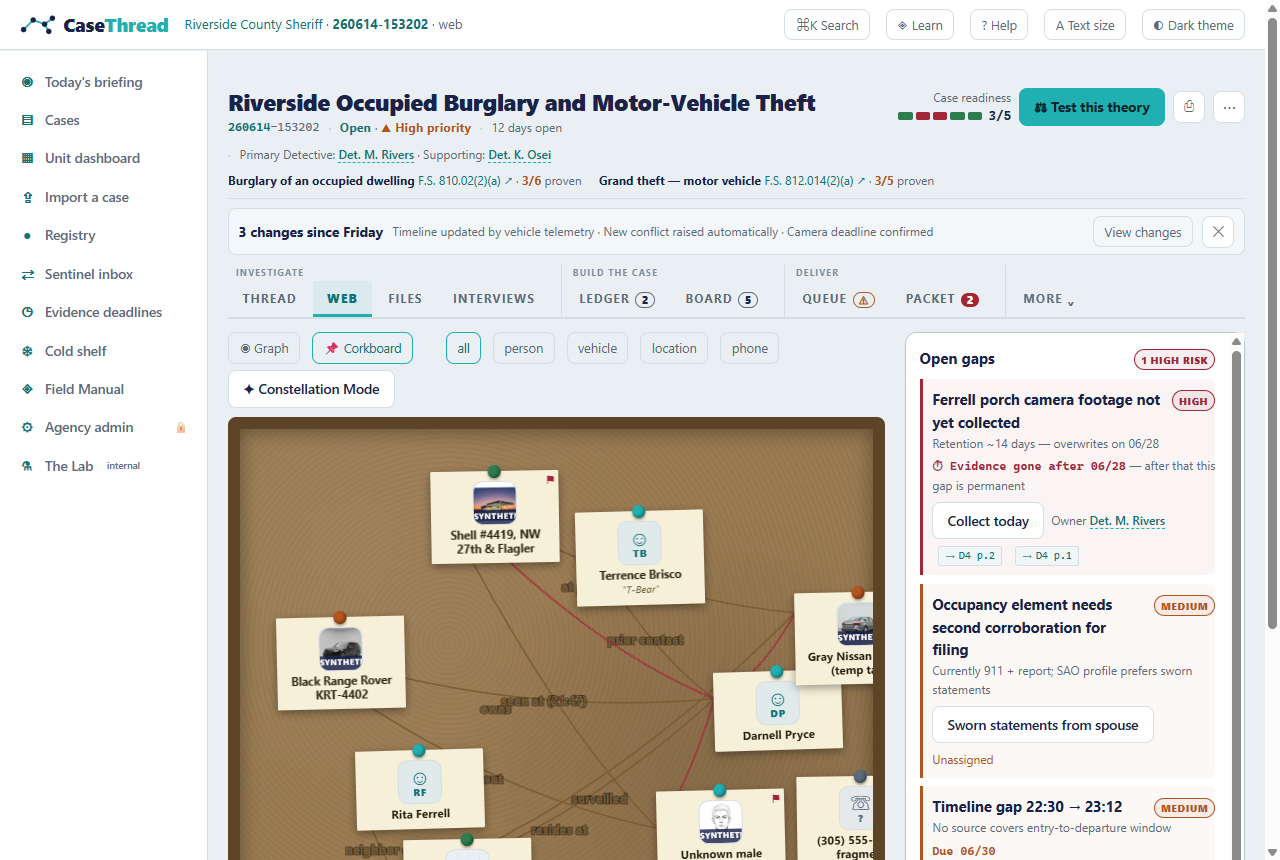
7.6 The Ledger (contradictions) — Available
What it does: every conflict between statements, evidence, and time — both exact sources side by side, with a "why it matters" line. How: review each card; Mark explained or Mark resolved once you've run it down. Your call persists and lands on the case record. Example: SYN-001's second card is the demo's quiet masterpiece — the initial suspect's timecard conflicts with the 21:00 theory: the earlier time frames him, the receipt timeline clears him.
[SCREENSHOT: ledger] 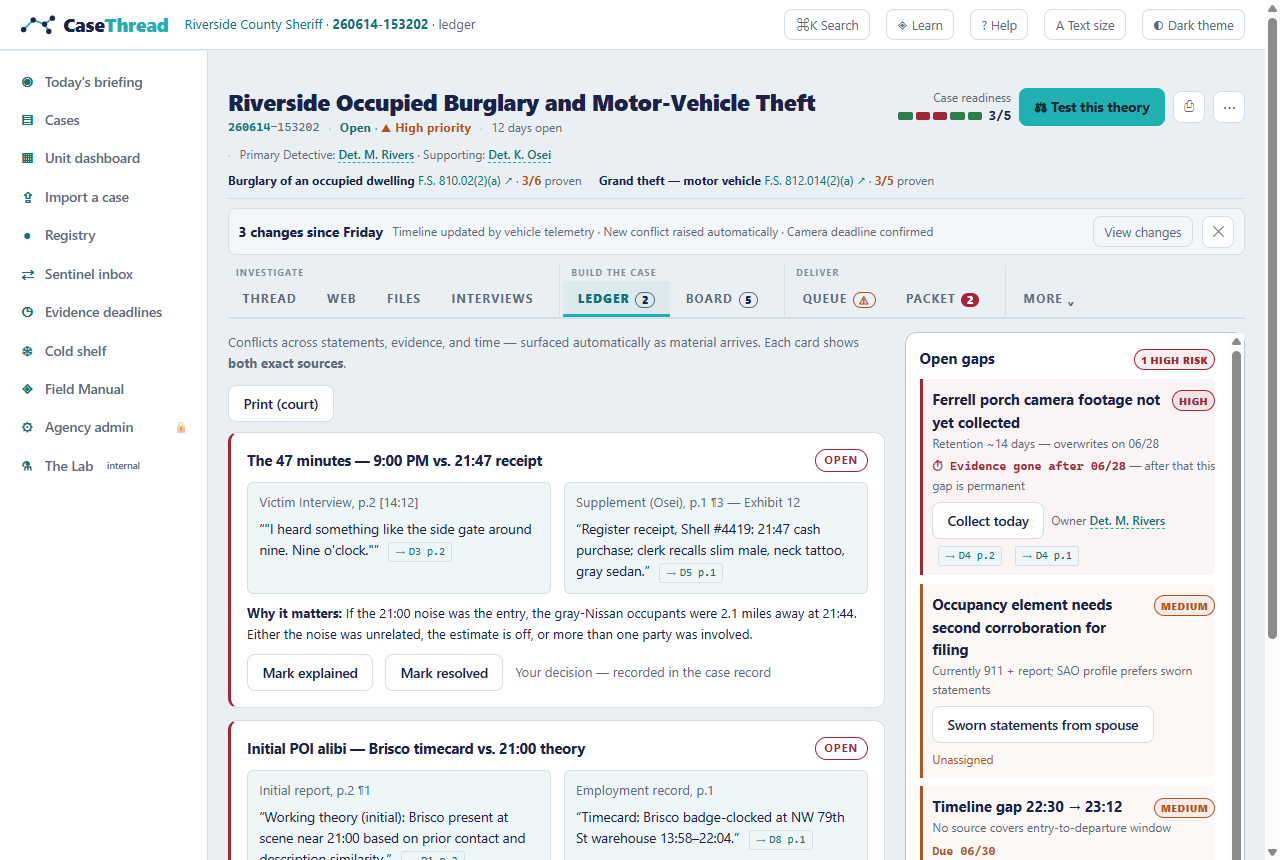
7.7 The Board (Elements Matrix + Devil's Advocate) — Available
What it does: the "prove it" surface. Elements Matrix: each element of each charged offense vs. the evidence supporting it, with plain-language glosses, admissibility flags, and pertinence notes — reconciled against the statute itself, so an element nobody addressed still shows (and glows). Devil's Advocate: competing hypotheses scored claim-by-claim, the mandatory misidentification theory, the confirmation-bias alarm, the defense's cross, and discriminating evidence. How: gaps glow; ⚖ Test this theory opens the adversarial dock. Example: on both SYN-001 counts, the glowing row is the same: identity of the perpetrator — the demo's honest answer to "what does beyond-a-reasonable-doubt still need?"
7.8 The Queue (leads + legal process) — Available
What it does: graded lead triage with expiry countdowns and the Legal Process Desk tracker with data-source playbooks. A lead has a life: evaluating → assigned → working → closed, with an owner and an outcome, each transition logged. Example: SYN-001's playbook card spells out who holds disabled-tracker telematics data (the dealer/OEM), what legal process it takes, and shows the preservation letter as served — the lawful path made fast. Limitation: the drafting features are illustrative.
7.9 The Vault (files) — Available (rich-media ingestion is Planned)
What it does: the evidence vault — every document with type, author, date, indexed span count, and SHA-256 fingerprint; the evidence log with admissibility flags. Imported cases carry real SHA-256 digests computed over the actual bytes of the files you dropped. Limitation — Partial: for corpus cases the drag-drop zone is a preview; for your own cases, use ⇪ Import a case (text formats read live; PDFs/photos/audio are accepted, listed, and badged PILOT).
7.10 The Copilot (interviews) — Available (live mode Planned)
What it does: the interview plan (facts to lock down, holdbacks, conflicts to probe), the post-interview deviation table (prior statement vs. new statement, both cited), and the missed-questions list. Example: SYN-003's deviation table shows the victim's time drifting between interviews — from "streetlights came on" to "8:00, maybe 8:15" — exactly the drift that strengthens the alibi. Limitation: the during-interview live prompt mode (recording upload + in-room prompts) is the top item on the pilot roadmap; consent guardrails are documented, not enforced in the demo.
7.11 The Packet — Available (release/export are Partial)
What it does: the prosecutor handoff. The completeness gate shows exactly why a packet isn't ready (open elements, unreviewed contradictions) — that gate is Brady diligence, and the case header's readiness meter and the Unit dashboard's "packets held" both read this same check. Limitation — Partial: Release packet and Discovery export are inert in the demo (nothing to send it to); the packet structure and gate logic are real.
[SCREENSHOT: packet] 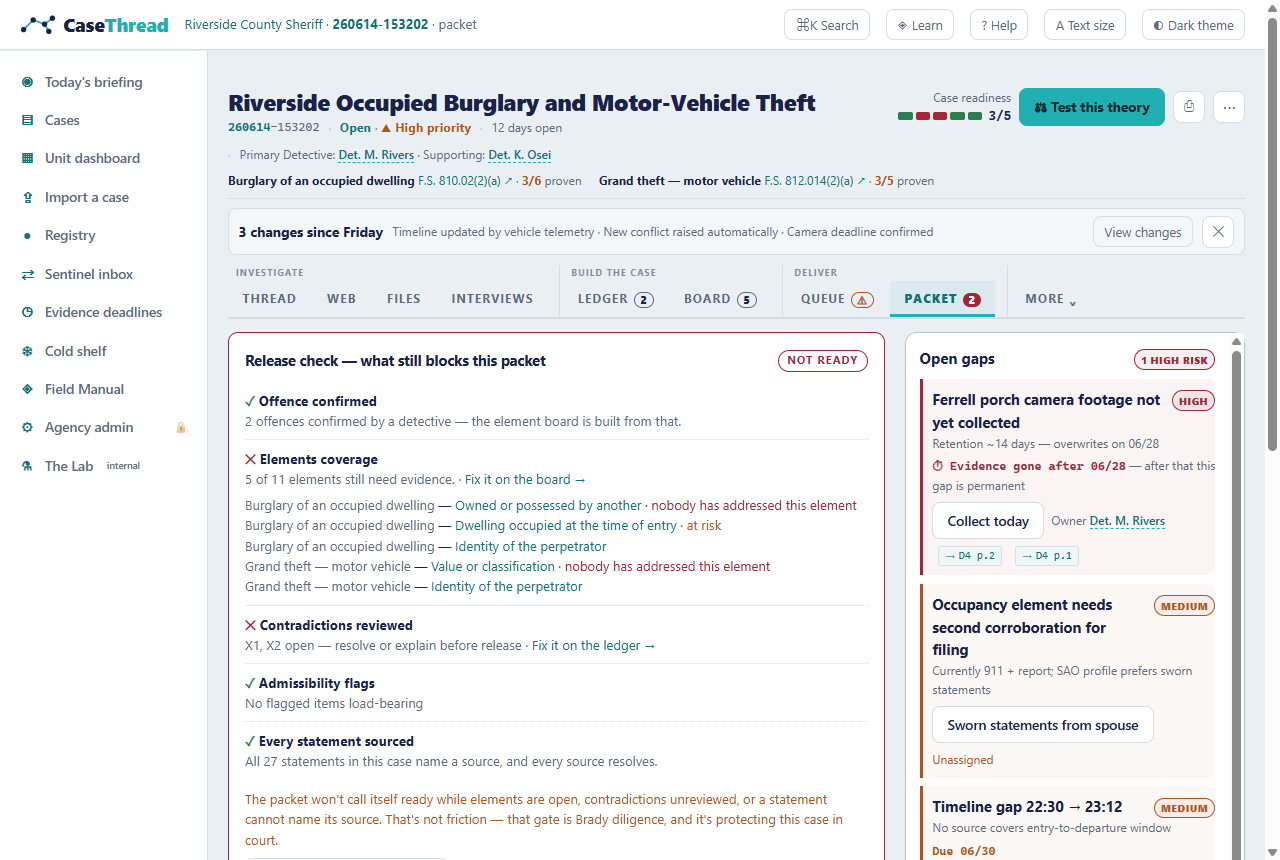
7.12 The Record — Available
What it does: the case's audit spine, on one screen — "we welcome the subpoena" made literal. Two halves. The citation check runs the cite-or-block validator live over the whole case: every timeline event, every statement, both sides of every contradiction, every recommended action. It reports how many were checked and whether each names a source that resolves — an uncited claim is blocked, never quietly hidden. The decision log keeps every human decision you've made — the accept, the reject, the "explained," the assignment, the merge — with who and when, and nothing is ever removed. On imported cases it also carries the entire review session: every keep, reject, correction, bulk act, and fold from the confirmation station. Where: the record tab in any case, or press 9. Why it matters: every competitor now attaches citations to what its AI writes. CaseThread is the one that refuses to write the sentence when the citation doesn't hold — and this is where you can see it proven, case by case.
7.13 Constellation Mode — Available
What it does: the same case graph as a navigable 3D constellation — time as depth, relationships as threads, contradictions pulsing red. Built for briefing rooms and command staff. How: press C inside any case; drag to orbit, scroll to zoom; ← Back to 2D to work. If your hardware can't run it, the app says so and the 2D Web carries the same data. Rule to know: nothing exists in 3D that isn't in 2D; print always comes from 2D.
[SCREENSHOT: constellation] 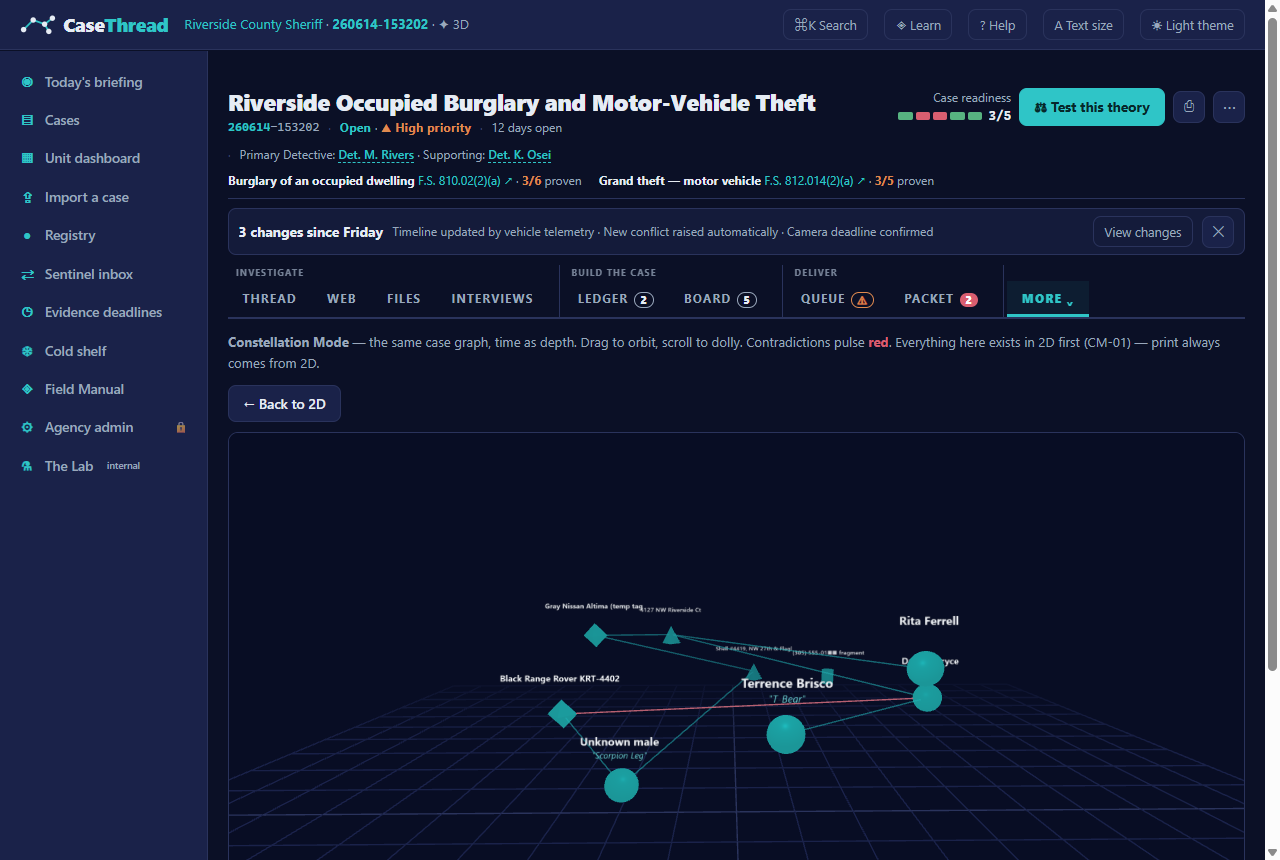
7.14 Import & the confirmation station — Available
What it does: turns your own files into a case, with a human gate on every record. Reading, extraction, and citation-building happen in your browser — no network, no model, nothing leaves the machine. One candidate per fact across the whole drop; confidence bands with reasons; the exact passage under every candidate; the pencil (corrections layer over extractions, never replace them); bulk keeps as single recorded, undoable acts; merge clusters ("possibly the same — you decide") that fold one person's other names into aliases with every citation kept; and a retained review session riding the created case. Where: ⇪ Import a case, /import. Example: drop the two Adams test documents (docs/testdata/import-adams/) — 12 candidates emerge; "Walter Grimsley" appears in both files but is one decision; "Dep. C. Alvarez" and "Dep. Alvarez" arrive as a merge cluster; "DCA-2016" arrives looking like a plate. Limitations: text formats only (.txt .md .csv .log .json .vtt .srt); PDFs/photos/audio are accepted and listed but need the pilot engine; offense classification on imported cases waits for a human to confirm the offense picture — the elements board and packet gates stay closed until then.
7.15 The First Import Drill — Available
What it does: the onboarding artifact for the import gate. The real confirmation station — same screen, same keyboard, same pencil, same merge card — run over a bundled practice file (Adams v. State, a published opinion; identifiers synthetic), graded at the end instead of creating a case. Where: /import/drill — linked from the import page ("First import?") and the Field Manual. The debrief: false records · real records lost · records for the deputy · the trap — each miss shows your call vs. the book with the passage-grounded reason. Fold direction is a preference, never a miss: one record for one man is what matters. The promise: practice leaves no record — nothing enters the case list, the Registry, or the audit trail. Run it as many times as you like.
[SCREENSHOT: drill-briefing] 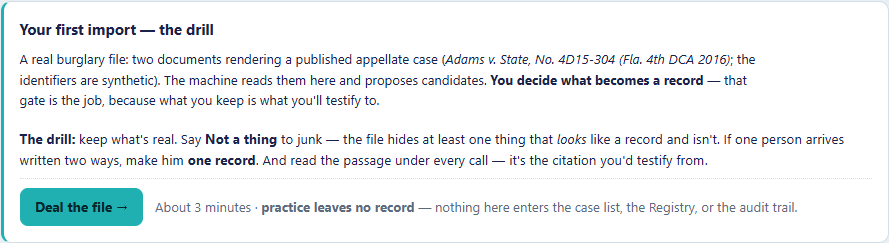
7.16 The Registry — Available
What it does: every confirmed record across your cases — people, officers, vehicles, plates, phones, places — one shelf, same rules for corpus and imported records. Each card: type, aliases in quotes, the cases it appears in, provenance ("Extracted from … · confirmed by …"), confidence, flags. The gate: case-initiated search only. There is no browse-everyone mode; the page states the refusal and why (no dragnet). Cross-case hits can be filtered to show only records appearing in 2+ cases. Export: CSV of the current results, with aliases and provenance columns. Example: search "Scorpion Leg" → one unknown male, two burglaries, the alias in quotes, every mention cited. Search "Alvarez" after the drill's real-import cousin → one deputy record carrying "Dep. Alvarez" as an alias — not two records for one man.
7.17 Entity profiles — Available
What it does: the cross-case view of one person, vehicle, phone, or place — headline, every case they appear in, every cited mention, flags, and aliases. Where: click any entity name anywhere (they're links), or search ⌘K. Example: /entity/per-scorpion — the unknown male with the neck tattoo: both burglaries, the car-wash tip, the pawn-shop departure, one page.
[SCREENSHOT: entity-profile] 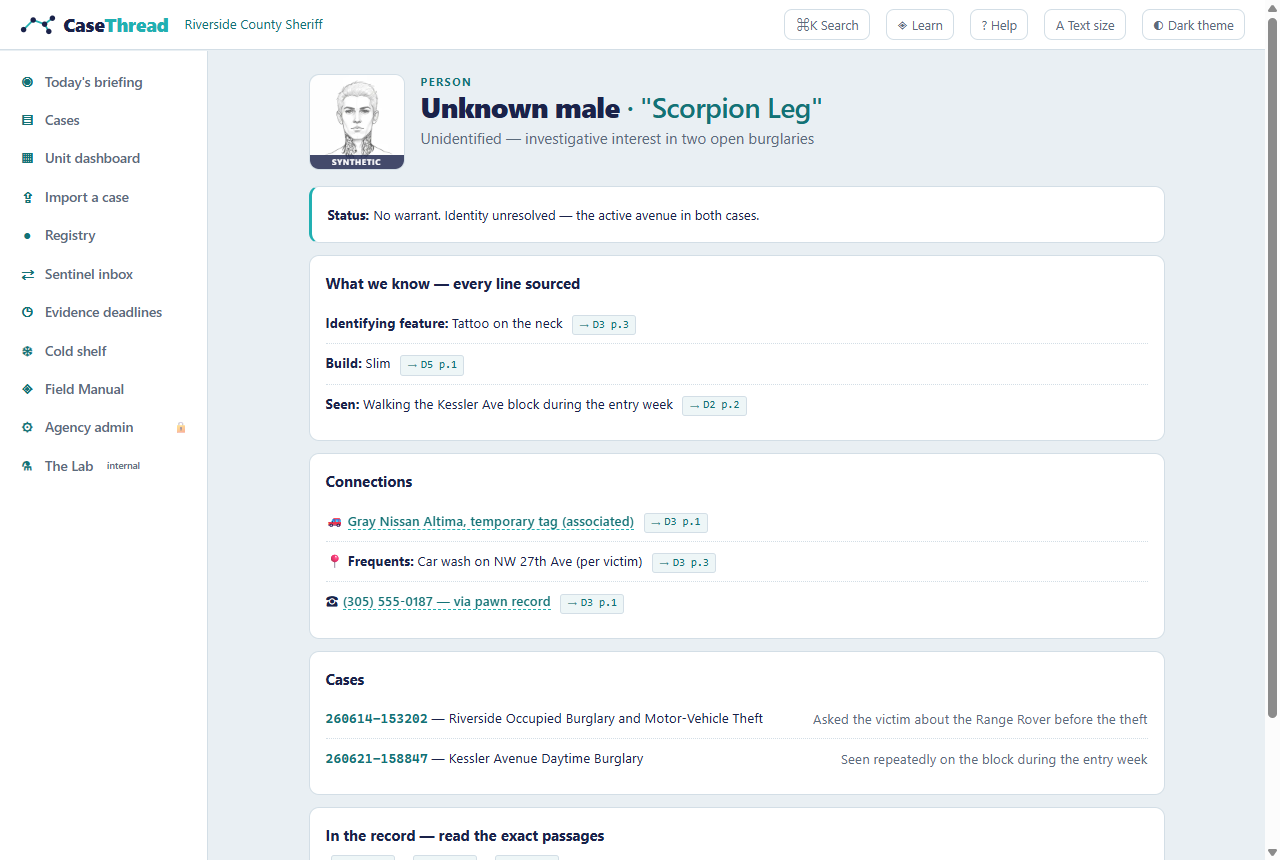
7.18 Evidence deadlines — Available
What it does: the department-wide expiry board — every perishable item across all cases (camera loops, retention windows, tow releases), soonest first, each linking into its case's queue. Where: ◷ Evidence deadlines in the left nav.
[SCREENSHOT: deadlines] 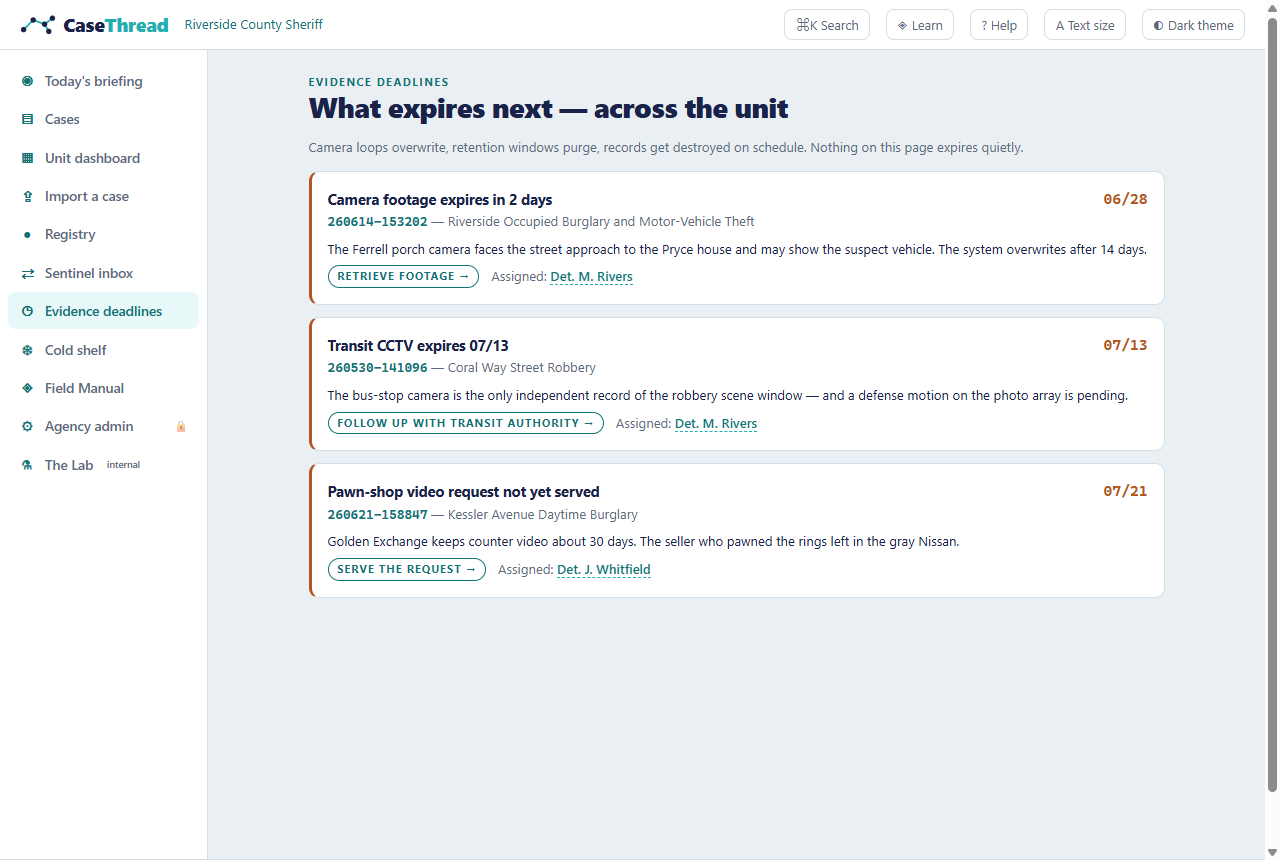
7.19 The Cold shelf — Available
What it does: cold cases with solvability rankings and restart plans — what changed since the case went quiet (new database hits possible, retention windows still open, witnesses still reachable) and the first three moves of a restart. Where: the Cold shelf on Department Home; click through for the full restart plan (e.g., the 1996 case's plan includes running its names and aliases against the current corpus). Limitation: rankings are precomputed for the demo; the live solvability engine is pilot scope.
7.20 The Sentinel inbox — Available (continuous scanning is Planned)
What it does: possible cross-case connections as decision cards — indicators for, evidence against, and your Confirm/Reject, recorded. Includes the refusal card (SYN-001 ↔ SYN-005: NOT linked, with reasons). Limitation: the demo shows curated cards; continuous background scanning (including over your imported cases) is pilot scope.
7.21 The Field Manual (◈ Learn) — Available
What it does: the permanent training wing — nothing in it expires. The guided tour (ten steps, resumable, restartable, wearing the brand), the Practice Case with live progress, the First Import Drill, the Replays (director-scripted, self-driving demos over the real UI — watch a detective work the corpus, take over anytime), field guides (one per view, each with a "Show me →" deep link), the keyboard reference, and the searchable glossary. Where: ◈ Learn in the top bar, /learn, or ⌘K → "Field Manual."
7.22 The Practice Case (TUT-101) — Available
What it does: a compact training case, badged TUTORIAL everywhere so it can never be mistaken for casework. Five lessons in the right rail; lessons 1–3 complete only when you actually perform the move (open a citation → view both sources of the contradiction → press Test this theory). Lesson 2's contradiction: the victim "locked the garage just after the 10 o'clock news" — but her own rideshare receipt says she got home at 23:41.
[SCREENSHOT: practice-case] 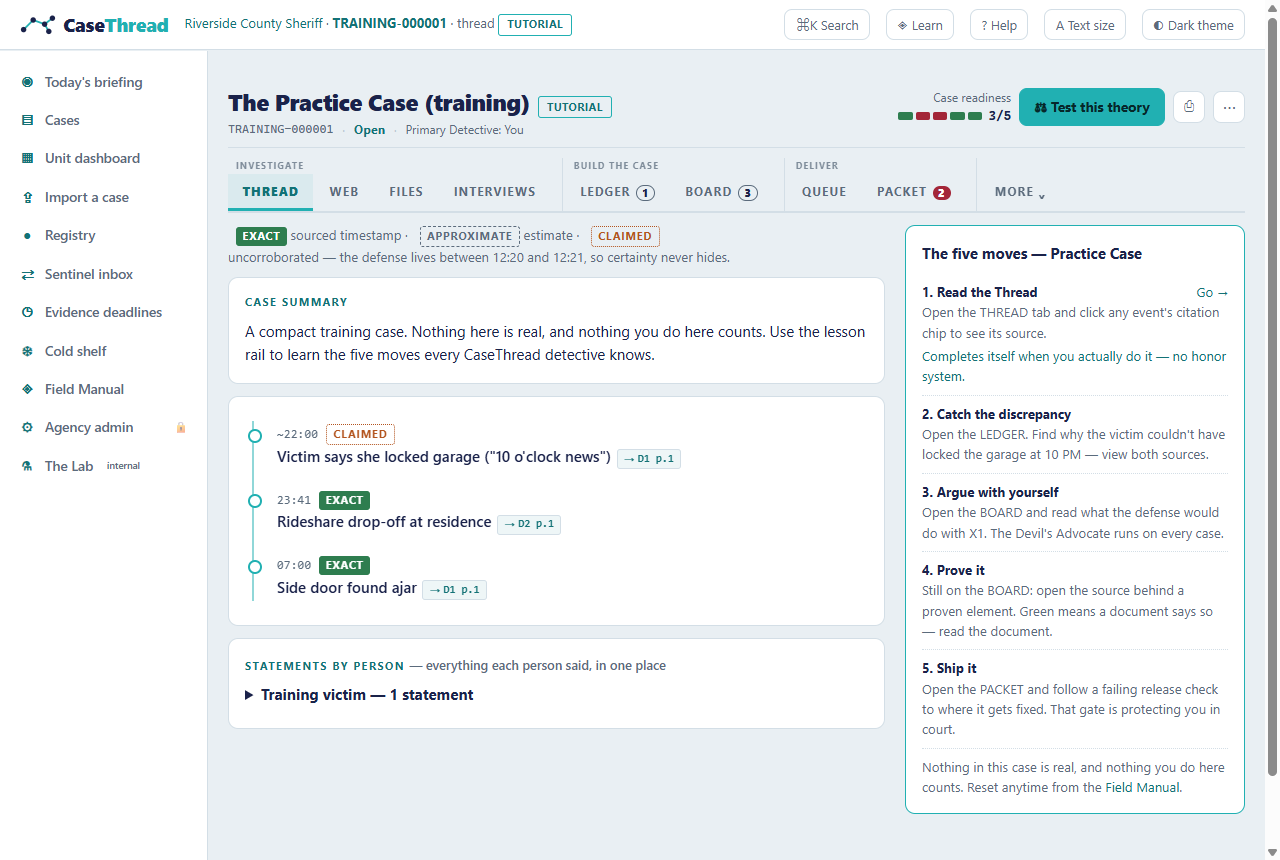
7.23 Agency admin — Available
What it does: the tenant settings surface (with a demo role switch standing in for real access control):
- Language packs & terminology — your agency's words for its units and roles; switching packs re-labels the product everywhere.
- Departmental case-number format — imported cases get numbers in your format.
- External map provider policy — where map links are allowed to point, if anywhere.
- The statute book — whose law the elements run on: jurisdiction, version, every offence with a "read the law" link (through the egress gate), and an ORI cross-check that warns when your agency's state doesn't match the book's (the Westside demo pack is a CA agency on the FL book — the card says so instead of hiding it).
- "Everywhere this product can reach" — the egress ledger: every outbound link the product contains, each allowed or blocked by your policy, with the count mirrored in the footer of every page. Zero network calls happen at runtime; this governs where links may take a human.
- The agency-wide audit trail — decisions that belong to no single case (pack switches, policy changes), visible here.
Example: switch the language pack and watch the breadcrumb, the unit dashboard, and the case-number format all change — then check "What changed here" at the bottom: the switch itself was logged.
[SCREENSHOT: admin-statute] 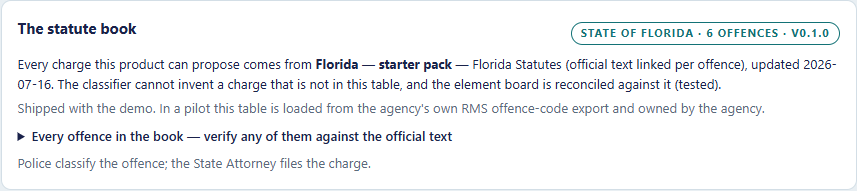
7.24 The Lab — Available (internal)
What it does: the internal bench — not a detective's screen. Every synthetic case is scored against the answer key (the truth files the engine never sees), and a playground lets you paste any text and watch the extractor and the offence classifier reason out loud, with the reason and the quote for every call. Type "he fired at me," then "he fired into the air," and watch the offence change. Where: ⚗ The Lab in the left nav (badged internal). Why it exists: if the machine can't survive this page, it has no business in front of a case.
7.25 Themes, printing, text size, hints — Available
War Room theme: the ◐ toggle switches to the dark briefing-room look (Constellation's natural habitat). Printing: Thread, Ledger, Board, and Packet each have a Print (court) button — print forces the light theme, strips the interface, and prints each citation as its full document name and page (not an internal id), with the offense charges on the page. Text size: the A button cycles standard → large → extra large; the whole instrument scales, not just the article text. Hints: the one-line view hints under the tab bar can be hidden once ("hide hints") and stay hidden.
7.26 Ask CaseThread (the assistant) — Available (model answers are opt-in)
What it does: a question box with a switch. The guide mode answers "how do I…" questions from this user guide; My cases mode answers "what do my cases say…" questions from your own case data — corpus and imported — in this browser. Either way, the law is the product's law: every answer cites, and every citation is a chip that takes you to the exact place in the app — a case tab, an entity, the unit dashboard, the import station. Ask "what cases is Scorpion Leg involved in?" and the chips walk you to him. Where: ✦ Ask in the top bar, on every screen. How it answers: retrieval runs in your browser, offline — the assistant finds the matching guide sections or case facts and, with no model configured, shows you that material verbatim (still cited, still navigable). That is the floor, and it never breaks. If your administrator configures a model (the Claude API, or a local model on your network), the retrieved material becomes the model's entire world and it writes a short answer — every factual sentence carrying a citation chip. The drawer always says which is happening: offline index, local model, or "this question left the building." The refusal: an answer the assistant can't ground isn't given — you get "the guide doesn't cover that" or "your cases don't mention that," plus where to look instead. If a model ever cites a location outside the app, the chip is shown struck and is not followed. Admin — configuring a model (optional): set environment variables on the server: HELPBOT_PROVIDER=claude with ANTHROPIC_API_KEY (model defaults to claude-opus-4-8, override with HELPBOT_MODEL), or HELPBOT_PROVIDER=ollama with OLLAMA_URL for a fully local model. With neither, the assistant runs retrieval-only and the demo's zero-external-calls posture holds. My cases mode with a cloud model sends case context to that API — the drawer discloses it on every such answer. Limitations: answers only from the guide index and your cases' recorded facts; it does not browse, does not speculate, and does not summarize documents it can't cite.
7.27 Specified but not in this demo — Planned
For completeness, major product capabilities that exist in the specification set (docs 00–09) but not in this build: rich-media ingestion with OCR/transcription and the live INVESTIGATOR analysis engine · Pattern Sentinel's continuous scanning (the demo shows its output as curated cards) · live Cold Case solvability computation · Interview live mode (recording upload + in-room prompts — the top unbuilt must-have) · warrant/preservation document generation · role-based access, audit export, and the deployment self-test · the prosecutor portal and deficiency loop.
8. Worked Examples
8.1 The Riverside Burglary in five minutes
- Department Home → morning digest flags SYN-001's camera lead expiring in 2 days. Click SYN-001.
- Thread — the handoff brief says the deputy never asked whether the side gate was locked; the victim callback added the gray sedan "sitting out front earlier that week." The timeline runs from the suspect-of-the-moment clocking in at work (pre-incident window) to the ⚑ 23:12 telematics kill.
- Ledger (
3) — two cards: the 9:00-vs-21:47 receipt conflict, and the timecard that makes the initial theory impossible. Click all four citation chips; read all four sources. - Board (
4) → ⚖ Test this theory — the bias alarm names the problem (pattern-matching, two conflicts); the grid shows the crew theory (H1) as best-supported; identity still glows unproven on both counts. - Queue (
5) — Lead L1 (the porch camera, 14-day loop) is the countdown that matters; the Legal Process Desk shows the telematics return that built the anchor. - Press
C— fly the case once. Then Back to 2D, because the work happens in 2D.
That walkthrough — folder to challenged theory — is the demo script's spine and the fastest way to show CaseThread to anyone.
8.2 The Adams import, start to registry
- ⇪ Import a case → drop
01-initial-incident-report.txtand02-supplement-lineup-and-registration.txtfromdocs/testdata/import-adams/(or run the drill first — same file, graded, no record). - Read the files → 12 candidates. Walter Grimsley appears in both documents but is one decision, marked "in 2 documents."
- Confirm what's real: keep the victim, the suspect, the detective, the vehicle, the tag, the phones, the scene. Reject DCA-2016 — read its passage: it's the appellate citation, not a plate. On the "Possibly the same" card, Merge into "Dep. C. Alvarez" — one deputy, "Dep. Alvarez" kept as an alias, both citations kept.
- Create the case. It opens on its thread with your agency-format case number, real SHA-256 digests, and the offense unclassified (the elements board stays closed until a human confirms the offense picture).
- ● Registry → search "Alvarez": one record —
Dep. C. Alvarez "Dep. Alvarez"— with provenance and confidence on the card. The review session — every act — is on the case record.
9. Admin & Operator Guide
Running the demo
| Task | How |
|---|---|
| Start | npm --prefix D:/git/casethread/app run dev → http://localhost:3111 |
| Production build | npm --prefix D:/git/casethread/app run build then npm --prefix D:/git/casethread/app run start |
| Requirements | Node 18+; no database, no API keys, no internet — the corpus ships inside the app |
| Port | 3111 (change in app/package.json scripts) |
Resetting demo state (before a demo!)
All user state lives in the browser's localStorage — the corpus itself never changes. To reset to factory-fresh: open DevTools → Console → localStorage.clear() → reload. What resets: welcome card, tour progress, lesson progress, theme, palette recents, hidden hints, dismissed banners, ledger/lead/Sentinel decisions, assignments, imported cases, corkboard note positions, and the audit trail. What never changes: the corpus cases, documents, contradictions.
Pre-demo checklist: localStorage.clear() · reload · confirm the welcome card shows · confirm light theme. Ten seconds, per the demo script's "corpus reset" rule.
Data & privacy posture
Synthetic corpus only; zero network calls at runtime; no analytics, no telemetry, no accounts. Files you import are read in the browser and stored in the browser — they never leave the machine. The egress ledger on Agency admin lists every outbound link the product contains and your policy's verdict on each; the footer of every page carries the live count. The pilot posture (agency-controlled deployment, CJIS alignment, audit export) is specified in docs/04-TRUST-COMPLIANCE.md.
10. Troubleshooting
| Symptom | Cause & fix |
|---|---|
| Constellation shows "3D unavailable" | The machine's graphics can't run WebGL — expected fallback; use the 2D Web (same data) |
| Constellation is choppy | Integrated graphics + big window; shrink the window or use 2D. Print/exports never depend on 3D |
| Tour card floats mid-screen saying nothing is highlighted | You're on a page the step doesn't target — click Take me there |
| Lessons won't complete in the Practice Case | Lessons 1–3 require the real action (open a citation; open both sources on the X1 card; press ⚖). "Mark done" only exists for lessons 4–5 |
| Keyboard shortcuts do nothing | Click the page background first (shortcuts pause while a text box has focus) |
| A decision reverted | Ledger, lead, Sentinel, assignment, and import decisions persist across reloads and appear on the case record. Only a localStorage.clear() resets them — that is the demo-reset command |
| My import created two records for one person | Undo is on the case's record for the session; on the next import, use the "Possibly the same — you decide" card to fold them into one record before creating. Run the drill (/import/drill) to practice |
| A PDF I dropped wasn't read | By design — the demo won't pretend. PDFs/photos/audio are listed and badged PILOT; reading them is pilot scope. Drop .txt/.md/.csv for live extraction |
| The page 404s its scripts after a rebuild | The production build wiped the dev server's compiled files. Restart the dev server (npm --prefix app run dev) and hard-refresh |
| Page looks wrong after an update | Hard refresh (Ctrl-F5); if odd state persists, localStorage.clear() |
11. FAQ
Is any of this real case data? The corpus, no — every person, place, number, and business is fictional. Files you import are yours, and they stay in your browser.
Does the AI decide anything? No. Every consequential action waits for a human (keep/reject, Confirm/Reject, assignment, merges, gate overrides), and anything inferred is labeled inference or AI-generated hypothesis — it cannot pose as fact.
Can I add my own case? Yes — ⇪ Import a case. Text documents are read live in the browser; every extracted record passes through your hands before it exists. (The frozen synthetic corpus is separate and never changes.)
Why won't the packet release? The completeness gate is doing its job: open element rows or unreviewed contradictions block release. That's Brady diligence, not friction.
What happens to candidates I never decided on? They stay candidates — in the case's Candidates drawer, out of the Registry, until you keep or dismiss them. Undecided is a first-class state, not a silent yes.
Does the drill leave anything behind? No. The First Import Drill writes nothing — no case, no Registry entries, no audit rows. That's the point: practice that can't contaminate discovery.
Why can't I rank my detectives by clearance rate? By design. CaseThread measures cases, not officers — volume and deadline exposure per person, never a rate or a rank. The refusal is written into the product.
Does the ✦ Ask assistant send my case data anywhere? Not by default. Retrieval runs in your browser, offline. Only if your administrator configures a cloud model does a question (and its retrieved context) leave the machine — and every such answer says so in the drawer. A local-network model keeps everything in the building.
Where did my tutorial progress go? It lives in the browser. A different browser/profile (or localStorage.clear()) starts fresh. Reset intentionally from the Field Manual.
Why does one Sentinel card refuse to connect two similar cases? By design — SYN-005 exists to prove CaseThread won't overconnect. The refusal card explains its reasons like any other finding.
12. Glossary
The living glossary is in the app — press ? or open the Field Manual. Key terms: claim labels (§5) · candidate / record (found by the machine vs. kept by a human — §5) · alias (a record's other names, each cited) · fold / merge (one person's renderings made one record, citations kept) · certainty bands (§5) · source span (the exact page/paragraph/timestamp a citation points to) · starting point anchor (where a digital trail dies — and where the next move begins) · completeness gate (the packet's release check) · stall (a case quiet more than 7 days) · the drill (the practice import — graded, recordless) · exceptionally cleared / no further action / unfounded / open-pending (the closure vocabulary) · Sentinel card (a possible cross-case connection awaiting human review) · the Loom (the evidence vault + case graph underneath everything).
13. Known Gaps & Honest Limits
- The corpus is frozen; your imports are not. The five synthetic cases never change (so every demo is repeatable). Imported cases are real records in your browser — but the deep analysis surfaces on them are limited: offense classification waits for human confirmation, and hypotheses/element analysis are not generated for imported files in this build (the live INVESTIGATOR engine is pilot scope).
- Some buttons are theater, and say so: Release packet, Discovery export, and the lead/legal drafting actions render the real UX but perform no operation — each is inert or
PILOT-badged rather than faked. - Rich media needs the pilot engine. PDFs, photos, and audio are accepted, listed, and badged
PILOT; only text formats are read live. - What persists: ledger explain/resolve, lead accept/reject, Sentinel confirm/reject, assignments, imported cases, corkboard positions, callbacks, and the audit trail — all in browser storage. A
localStorage.clear()is the deliberate reset. - No accounts or roles yet — single-user demo with a role switch on Agency admin (real RBAC is pilot scope). The audit UI exists; the export of the record is
PILOT-badged (no endpoint offline). - Corpus analysis is precomputed. The INVESTIGATOR engine's outputs on synthetic cases (hypotheses, scores, actions) were authored into the corpus to be deterministic and demo-safe. The extractor and offence classifier that run on your imports and in the Lab are real and run locally.
- Screenshots in this guide were captured from v0.3.0 on 2026-07-17 at 1280×860 (element-cropped); re-run the capture after UI changes.
14. Documentation Maintenance Notes
- Version documented: v0.3.0 (from
docs/VERSION) · Date: 2026-07-17. - Inspected: the running app at localhost:3111 (all routes exercised live, including
/unit,/import,/import/drill,/registry,/cases,/deadlines,/admin,/lab),app/src/lib/*(corpus, review, extract, goldset, unit, cork, callbacks, registry, egress), all page components,Chrome.jsx, and the bench (app/tests/run.mjs, 157 assertions) as the source of behavioral truth. - Assumptions: single-user demo context; readers are non-developers except in the Admin section; the dev server command documented is the one wired into the repo.
- Version note:
docs/VERSIONwas advanced 0.2.0 → 0.3.0 in this pass to match the product's own declaration (HANDOFF.md: "product v0.3.0") — the anchor had gone stale, not the product. - Anchors for tooling: each section carries an HTML comment of the form
app:followed by the route of the app surface it documents; the in-app help assistant indexes the guide by heading anchor + that route. Keep both stable. - Screenshots: element-cropped captures via Playwright into
docs/user-guide-assets/(1280×860, light theme; Constellation in War Room theme). The capture manifest isdocs/user-guide-assets/shots.json. - Render pipeline:
node C:\Users\taskm\.claude\skills\user-guide-builder\scripts\render-guide.mjs --in docs/user-guide.md --out docs/user-guide.html --brand docs/brand.json --version docs/VERSIONthennode docs/strip-lazy.mjs(Chromium's lazy image loading is unreliable when the guide is opened as a local file; the strip step makes images eager). - Changed in this pass (v0.3.0): added the Unit dashboard, Cases browser, Corkboard, Import & confirmation station (bands, pencil, bulk acts, merge clusters, Candidates drawer), the First Import Drill, Registry (aliases, provenance, CSV), entity profiles, Evidence deadlines, Cold shelf, Agency admin (packs, statute book, egress ledger, audit trail), the Lab, text size, victim callbacks, assignment, and Ask CaseThread (§7.26 — the two-mode assistant with navigating citations); refreshed every stale claim (tour is ten steps; imports exist; decisions persist); added `
route anchors and new screenshot markers; retired the false "corpus is frozen so you can't add cases" FAQ. The rendered guide also ships inside the app at/guide/index.html, and the assistant's index (app/src/lib/guide-index.json) is rebuilt from this file — after editing, re-run the render +build-index.mjs+docs/finish-help-index.mjs+ copy toapp/public/guide/`.